Draw a C4 diagram
Draw a C4 model — context, container, component or deployment — with the notation's authentic look: solid person/system/container/component fills and a [Type: technology] subtitle under each box. Deployment-level stencils (c4-deployment-node, c4-infrastructure-node, c4-container-instance) deliberately keep the outline look — no fill override, by design.
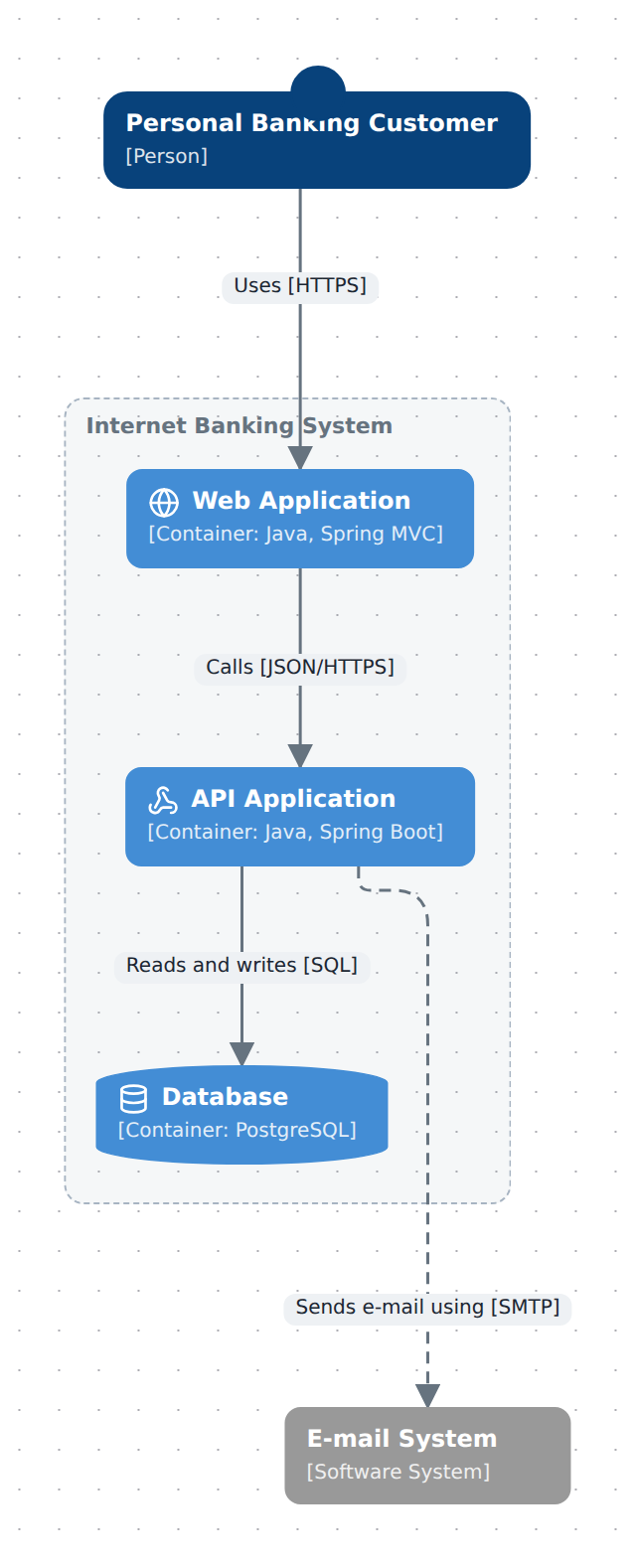
C4 elements are ordinary nodes with type: 'c4-*' — stencils from the Library panel's C4 categories, or free-form in the DSL. What makes the picture read as C4 is the notation (turns the fills on) and technology (the per-node subtitle); neither exists only for C4, but both were built for it.
In TypeScript
Pin the notation on the model, then declare the context-level nodes:
import { model } from '@diagc/core';

const m = model('docs-c4', { name: 'Internet banking system' });
m.notation('c4');

const customer = m.node('customer', { type: 'c4-person', name: 'Personal Banking Customer' });
const banking = m.node('banking', { type: 'c4-system', name: 'Internet Banking System' });
const mail = m.node('mail', { type: 'c4-system-external', name: 'E-mail System' });
Drill in: containers are ordinary children, and
technologycomposes into the type subtitle ([Container: Java, Spring Boot]):const web = m.node('web', { type: 'c4-container-web', name: 'Web Application', technology: 'Java, Spring MVC' }); const api = m.node('api', { type: 'c4-container-api', name: 'API Application', technology: 'Java, Spring Boot' }); const db = m.node('db', { type: 'c4-container-db', name: 'Database', technology: 'PostgreSQL' }); banking.contains(web, api, db);Relate them — a relation
labelis where the protocol goes, C4-dynamic-diagram style:m.relate(customer, web, { kind: 'sync', label: 'Uses [HTTPS]' }); m.relate(web, api, { kind: 'sync', label: 'Calls [JSON/HTTPS]' }); m.relate(api, db, { kind: 'reads', label: 'Reads and writes [SQL]' }); m.relate(api, mail, { kind: 'async', label: 'Sends e-mail using [SMTP]' }); export default m;diagc compile, open it in the studio or publish it. Double-click Internet Banking System to drill into its containers.
The whole picture above is .diagrams/src/docs/c4.diagram.ts in this repo.
In the studio
- Layers & planes, in edit mode: set Notation to
C4— at the top for a single-plane diagram, or on a plane's own row if the diagram declares several (a plane'snotationwins over the model's where both are set). - Drag stencils off the C4 · Context, C4 · Container, C4 · Component, C4 · Deployment and C4 · Code categories in the Library panel — see Use the icon library for which section matches which diagram level. Drag one onto another to nest a container inside a system, a component inside a container.
- Select a node — the Properties panel's Technology field sets the per-node subtitle.
- Clear a node's Colour swatch to let the C4 notation's fill show through (see precedence, below).
What to know
- An explicit node colour always beats the notation's fill. That's the standing rule for every notation, not a C4 special case —
node.color, and failing that a modeltypeColorsentry, wins over whatever the active notation would paint. The Library's C4 cards set an explicitcoloron every stencil, so a dropped Person or Software System already reads about right without turning the notation on at all — but that same colour then shadows the authentic multi-shade palette once you do. The External twins carry a grey close to the notation's own, so they look right regardless; the others need their Colour swatch cleared (orm.node(...)called withoutcolor, as in the DSL example above) to show it. This diagram's nodes never setcolor, so the fill is the notation speaking. - Sketch/hand-drawn presets keep the outline look. Rough rendering (
sketch,hand-drawn,pencil,blueprint,marker) never fills a C4 box solid — the wobbly stroke stays an outline over the plain canvas whatever the notation says, so switching presets mutes the palette back down. - Component text goes dark, everyone else's goes white. The pale component blue (
#85bbf0) fails contrast against white, soc4-component*types render dark text on it; person/system/container/external all render white on their darker fills. technologyis not C4-only. It is a plain field onDiagramNode, appended to the type subtitle in any notation —service: Goon a plain node,[Container: Go]on a C4 one — C4 is simply where it matters most.
Examples
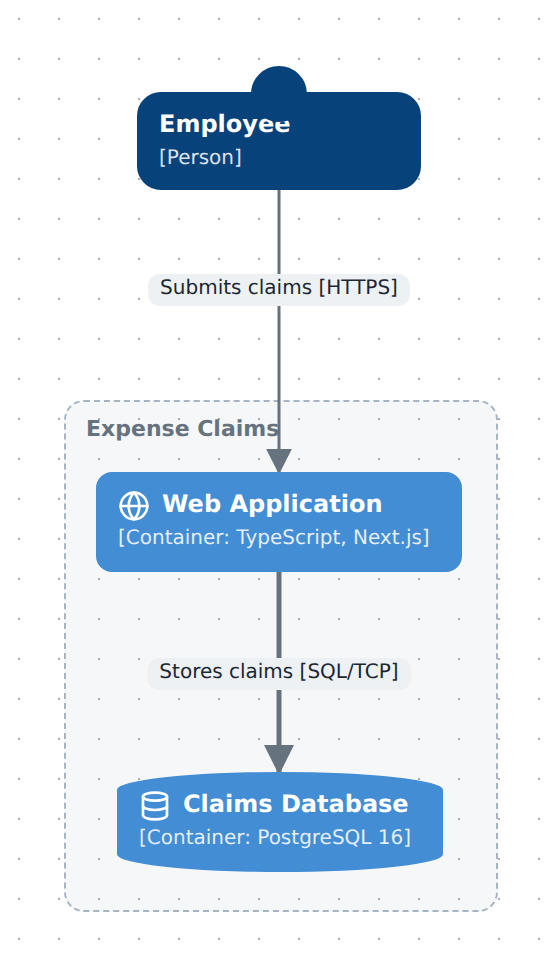
Starter — one person, one system, two containers, with the notation pinned and every relation labelled. Copy it into .diagrams/src/ and change the names.
import { model } from '@diagc/core';

// A C4 starter: one person, one system, two containers. The notation is what
// paints the solid fills.
const m = model('expense-claims', { name: 'Expense claims' });
m.notation('c4');

const employee = m.node('employee', { type: 'c4-person', name: 'Employee' });
const claims = m.node('claims', { type: 'c4-system', name: 'Expense Claims' });

const web = m.node('web', { type: 'c4-container-web', name: 'Web Application', technology: 'TypeScript, Next.js' });
const db = m.node('db', { type: 'c4-container-db', name: 'Claims Database', technology: 'PostgreSQL 16' });

claims.contains(web, db);

m.relate(employee, web, { kind: 'sync', label: 'Submits claims [HTTPS]' });
m.relate(web, db, { kind: 'writes', label: 'Stores claims [SQL/TCP]' });

export default m;
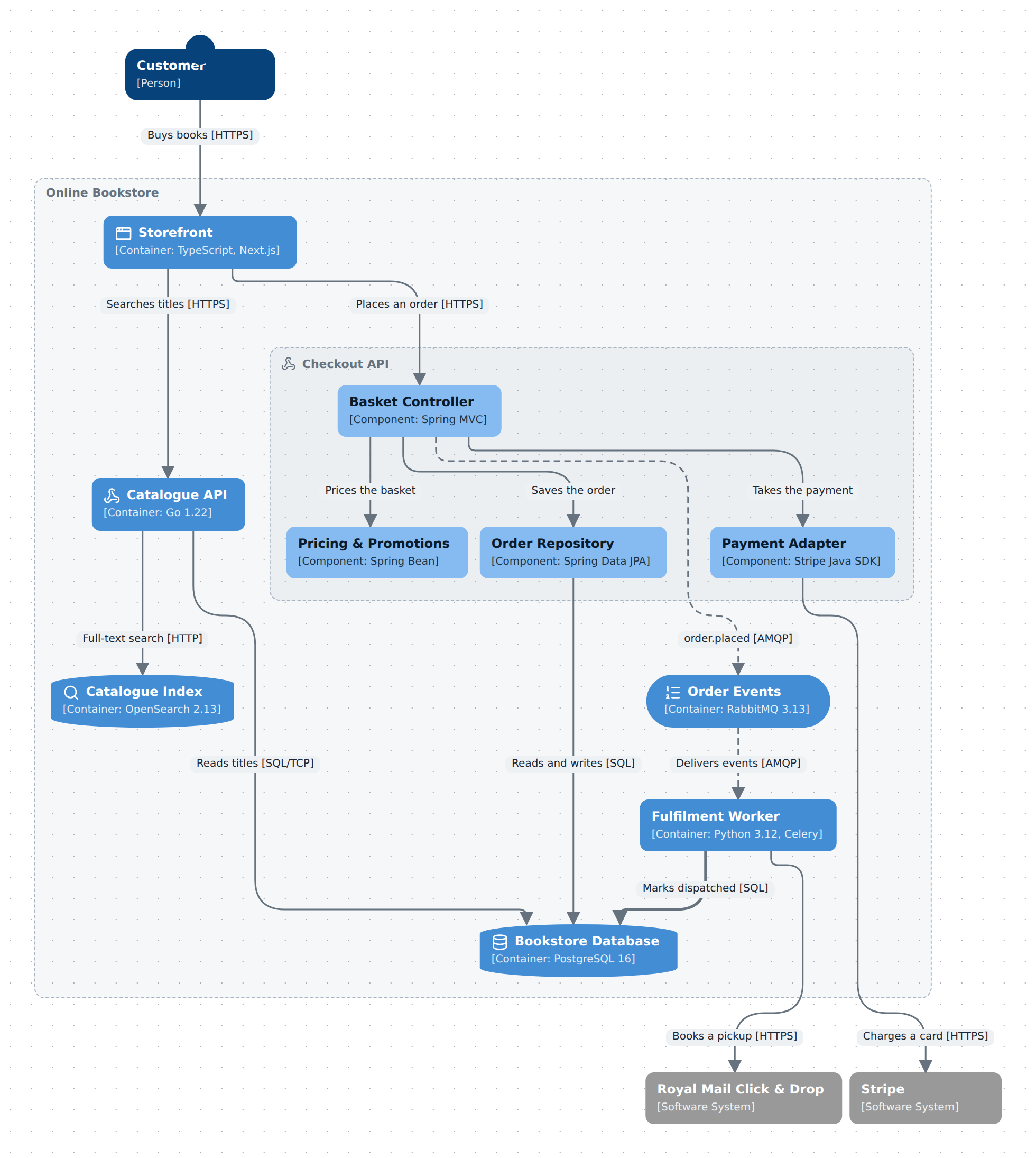
Online bookstore — one shop at all three C4 levels: a customer and two external systems at context level, seven containers inside the bookstore, and the Checkout API's own components one drill further down. It uses technology on every container and component, the database and queue container types, and relations drawn to the component that answers rather than to the box around it — folded, they aggregate onto the container, so the context view still reads. Source
See also
- Builder API —
m.notation, andtechnologyinm.node's options - Model reference —
notationon the model and per plane;technologyon a node - Use the icon library — placing C4 stencils from the palette
- Publish and share — the page and the PNG work as for any diagram