Draw a git branching diagram
Show how releases, hotfixes, nightlies and feature work flow between branches — lanes of commits, with the branch-offs and merges drawn between them.
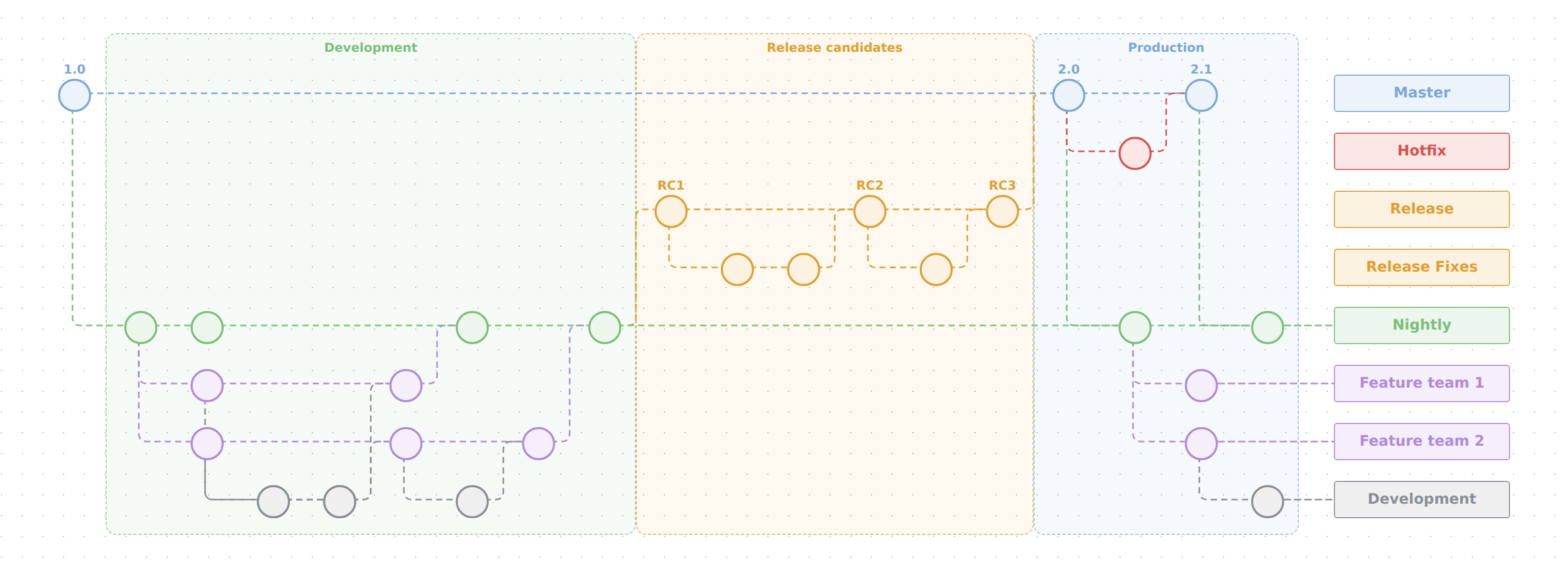
In TypeScript
Declare the model a git graph, then its lanes top to bottom:
import { model } from '@diagc/core';

const m = model('branching', { name: 'Branching strategy' });
const g = m.gitGraph();
const master = g.branch('master', { name: 'Master', color: '#7ba7d9' });
const hotfix = g.branch('hotfix', { name: 'Hotfix', color: '#d9534f' });
const nightly = g.branch('nightly', { name: 'Nightly', color: '#7bbf7b' });
Add commits.
commit()continues a lane;commit({ from })starts a new run of it from a commit elsewhere;merge(src)adds a commit that absorbs another lane's:const v10 = master.commit('1.0'); // tagged const n1 = nightly.commit({ from: v10 }); // Nightly starts from 1.0 const n2 = nightly.commit(); // untagged, follows n1 const v20 = master.merge(n2, { tag: '2.0' }); // 2.0 takes Nightly const hf = hotfix.commit({ from: v20 }); master.merge(hf, { tag: '2.1' }); export default m;diagc compile, open it in the studio or publish it. Columns are computed: every commit sits one column after everything it follows, branched from or merged — nothing to date. Leave a deliberate gap withcommit({ tag: '2.0', gap: 3 }).Optionally frame the stages the history went through. A stage is a named frame across every lane, spanning the columns of the commits it names:
g.stage('development', { name: 'Development', from: n1, to: n4, color: '#7bbf7b' });
g.stage('stabilisation', { name: 'Release candidates', from: rc1, to: rc3, color: '#e0a030' });
Declare a stage after the commits it names.
todefaults tofrom(a one-column frame); two stages over neighbouring columns share a wall. The titles take a band above the first lane, so a graph with stages is a little taller than one without.
The whole picture above is .diagrams/src/docs/git-graph.diagram.ts in this repo.
In the studio
- Create a diagram and, in Layers & planes, give its plane the
git-graphnotation (or open a JSON diagram whose plane already has it). - Press Edit. The Git panel appears on the right.
- Add lane for each branch, top to bottom, with a colour if you like.
- Add commit to a lane (tag and gap are optional) — or, on the canvas, select a lane or the last commit on it and press its
+(orTab): the commit lands at the lane's tip and its tag opens for typing, soTab, tag,Tab, tag … runs a lane out. Select a commit, then Branch it into another lane or Merge it into one — each is a single undo step. A commit that already has a successor on its lane offers no+: a second child there would be a branch, and that needs a lane to land on. - Rename a commit's tag by double-clicking it; delete, recolour and describe commits and lanes as any node.
What to know
- Lanes never fold. Semantic zoom leaves them alone; dragging a commit still works, and the plane's Auto-layout switch freezes or frees positions as on any plane. The algorithm, direction, spacing and routing pickers are hidden — the notation owns the arrangement.
- Colours. A commit takes its lane's colour unless it sets its own. A branch-off is drawn in the lane it starts; a merge in the lower of the two lanes (so feature work keeps its colour on the way up, and a trunk merging down takes the lane it lands in).
- Tags are the commit's name; an empty name draws a plain circle.
- Stages are
git-stagenodes whose span is metadata (from,to: commit ids), not containment — a commit already belongs to its lane. The frame lets clicks through to the commits inside it; grab it by its title. There is no Git-panel form for stages yet: author them in the source. - Rules. Links of kind
commit,branchandmergemust join two commits;commitstays in a lane, the other two cross lanes; at most one incomingcommitand one incomingbranchper commit; no cycles. The compiler and the studio's save both report a violation by its validation code.
Examples
Starter — a feature branch cut from main, two commits, and a tagged merge back. Copy it into .diagrams/src/ and change the names.
import { model } from '@diagc/core';

// Copy this file, rename the branches and the tag, and grow your own history.
const m = model('dark-mode-toggle', { name: 'Dark mode toggle' });
const g = m.gitGraph();

const main = g.branch('main', { name: 'main', color: '#2f6fed' });
const feature = g.branch('dark-mode', { name: 'dark-mode', color: '#b08ad9' });

const base = main.commit();
feature.commit({ from: base });
const latest = feature.commit();
main.merge(latest, { tag: 'v3.2.0' });

export default m;
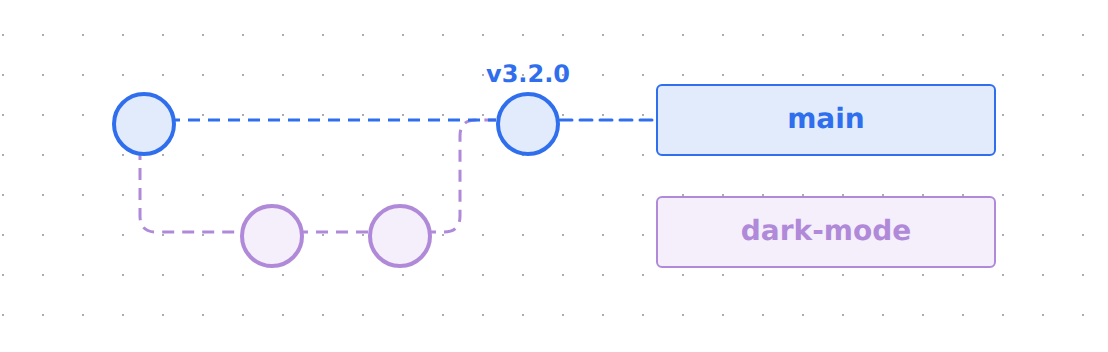
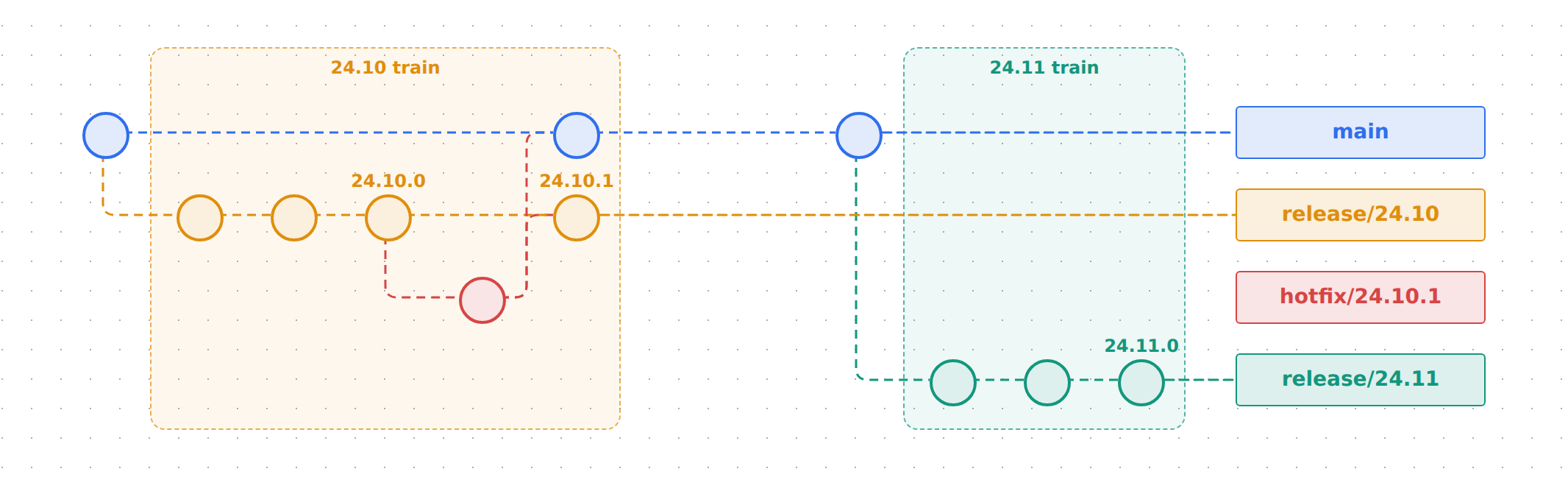
Courier app release train — a trunk-based release train cutting two release branches from main, and a hotfix that lands on a release and is backported to main before the next cut. It exercises commit({ from }), merge, a gap, two stage frames and per-lane color. Source
See also
- Builder API —
gitGraph,branch,commit,merge,stage - Model reference — what the nodes and relations mean on a
git-graphplane - Publish and share — the page and the PNG work as for any diagram