Draw a second-order thinking diagram
Show what follows from a decision, and what follows from that: a consequence tree, banded by how many steps from the decision each consequence sits — 1st order, 2nd order, 3rd order, each tinted good, bad or neutral.
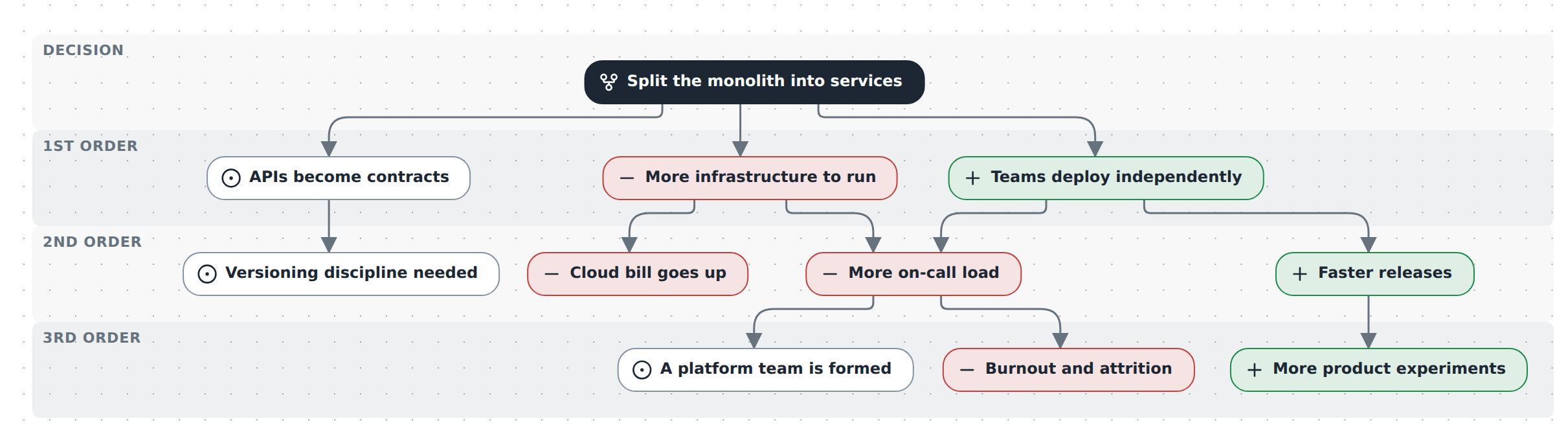
In TypeScript
Declare the model a second-order diagram, then chain "and then what?" from the decision:
import { model } from '@diagc/core';

const m = model('docs-second-order', { name: 'Second-order thinking: splitting the monolith' });
const so = m.secondOrder();

const split = so.decision('split', 'Split the monolith into services');

const deploys = split.then('deploys', 'Teams deploy independently', { valence: '+' });
const infra = split.then('infra', 'More infrastructure to run', { valence: '-' });
const contracts = split.then('contracts', 'APIs become contracts', { valence: '0' });

const faster = deploys.then('faster', 'Faster releases', { valence: '+' });
const oncall = infra.then('oncall', 'More on-call load', { valence: '-' });
infra.then('cost', 'Cloud bill goes up', { valence: '-' });
contracts.then('versioning', 'Versioning discipline needed', { valence: '0' });
deploys.leadsTo(oncall);

faster.then('experiments', 'More product experiments', { valence: '+' });
oncall.then('burnout', 'Burnout and attrition', { valence: '-' });
oncall.then('platform', 'A platform team is formed', { valence: '0' });

export default m;
The four calls:
Call Returns Notes m.secondOrder(opts?)SecondOrderBuilderDeclares the model's notation. opts.plane/opts.namekeep it beside other views of the same model; with noplanethe notation is model-wide. Once per model.so.decision(id, name?, opts?)ConsequenceRefThe root of a tree. Several decisions can share one set of bands. ref.then(id, name?, { valence?, label?, description?, color? })ConsequenceRefWhat follows from ref: creates the consequence and the arrow that leads to it, and hands back a ref you can keep chaining from.ref.leadsTo(other, { label? })refJoins two branches: refalso leads to a consequence declared elsewhere, without creating a new node.valenceis'+' | '-' | '0'(good / bad / neutral) and defaults to neutral.leadsTois how two branches arrive at the same consequence — above,deploysandinfraboth lead intooncall.diagc compile, open it in the studio or publish it.
The whole picture above is .diagrams/src/docs/second-order.diagram.ts in this repo.
In the studio
- Create a new JSON diagram and, in Layers & planes, set its Notation to Second-order thinking.
- Press Edit. The And then what? panel appears on the right.
- Add a decision, name it.
- Select it and pick Good consequence, Bad consequence or Neutral consequence — or press
Tab, or click the+on the selected box, for a neutral one. Type the name and pressTabagain to chain (it commits the name and opens the next consequence);Ctrl/Cmd+Enteror a click elsewhere commits without adding — plainEnterstarts a new line instead. - Select the new consequence and repeat —
Tabor its+again — to go one order deeper. - Changing a consequence from good to bad (or to neutral) is its type in the node panel, not a separate field.
The palette's Second-order thinking section holds the same four stencils (decision, good/bad/neutral consequence) for drag-and-drop.
How the bands are decided
A band is never authored — it is derived from the graph: the longest path from any decision. A consequence reached both directly from a decision and through another consequence lands in the later band, so every cause sits above its effect. Several decisions in one diagram share the same set of bands.
Moving a box by hand does not change its band. The order comes from the graph, not the position, so dragging a consequence out of place just stretches its stripe to keep containing it.
What it will not do
- A loop is an error here. Consequences form a cycle →
so-cycle. A feedback loop is a causal-loop diagram — use that notation for it. - Decisions and consequences cannot be grouped. Nesting one in a container fails validation with
so-contained— a band and a group want the same rectangle. - The layout algorithm is fixed to layered. The bands ride elk's own layer partitions, so the algorithm picker is withheld. Direction, spacing and edge routing stay adjustable — switch to a left-to-right flow and the bands turn into columns, headers on top.
- A consequence nothing leads to yet is an error too (
so-unreachable) — a stencil dropped from the palette before it is connected, say. The studio will not save until an arrow leads to it, so draw the arrow, or use "And then what?" /Tab/ the node's+, which create the box and its arrow together.
Examples
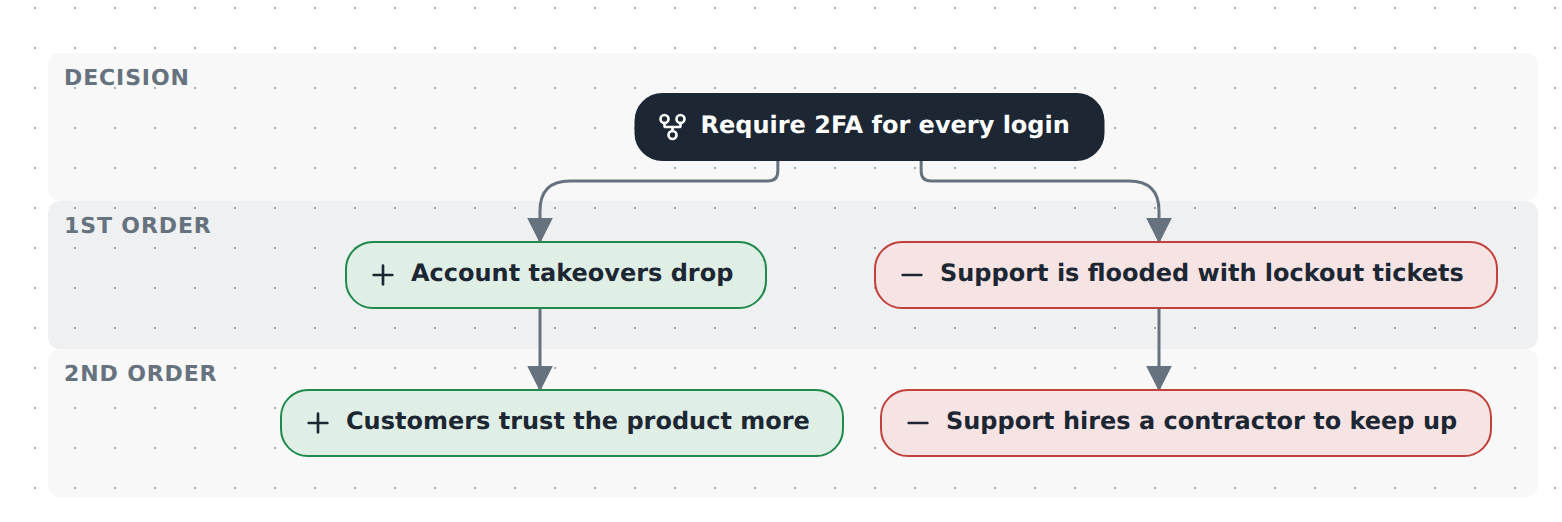
Starter — one decision, a first-order win and a first-order cost, each carrying one consequence further out. Copy it into .diagrams/src/ and change the names.
import { model } from '@diagc/core';

const m = model('require-2fa', { name: 'Requiring two-factor authentication' });
const so = m.secondOrder();

const decision = so.decision('mandate-2fa', 'Require 2FA for every login');

const fewerBreaches = decision.then('fewer-breaches', 'Account takeovers drop', { valence: '+' });
const lockouts = decision.then('lockouts', 'Support is flooded with lockout tickets', { valence: '-' });

fewerBreaches.then('trust', 'Customers trust the product more', { valence: '+' });
lockouts.then('contractor', 'Support hires a contractor to keep up', { valence: '-' });

export default m;
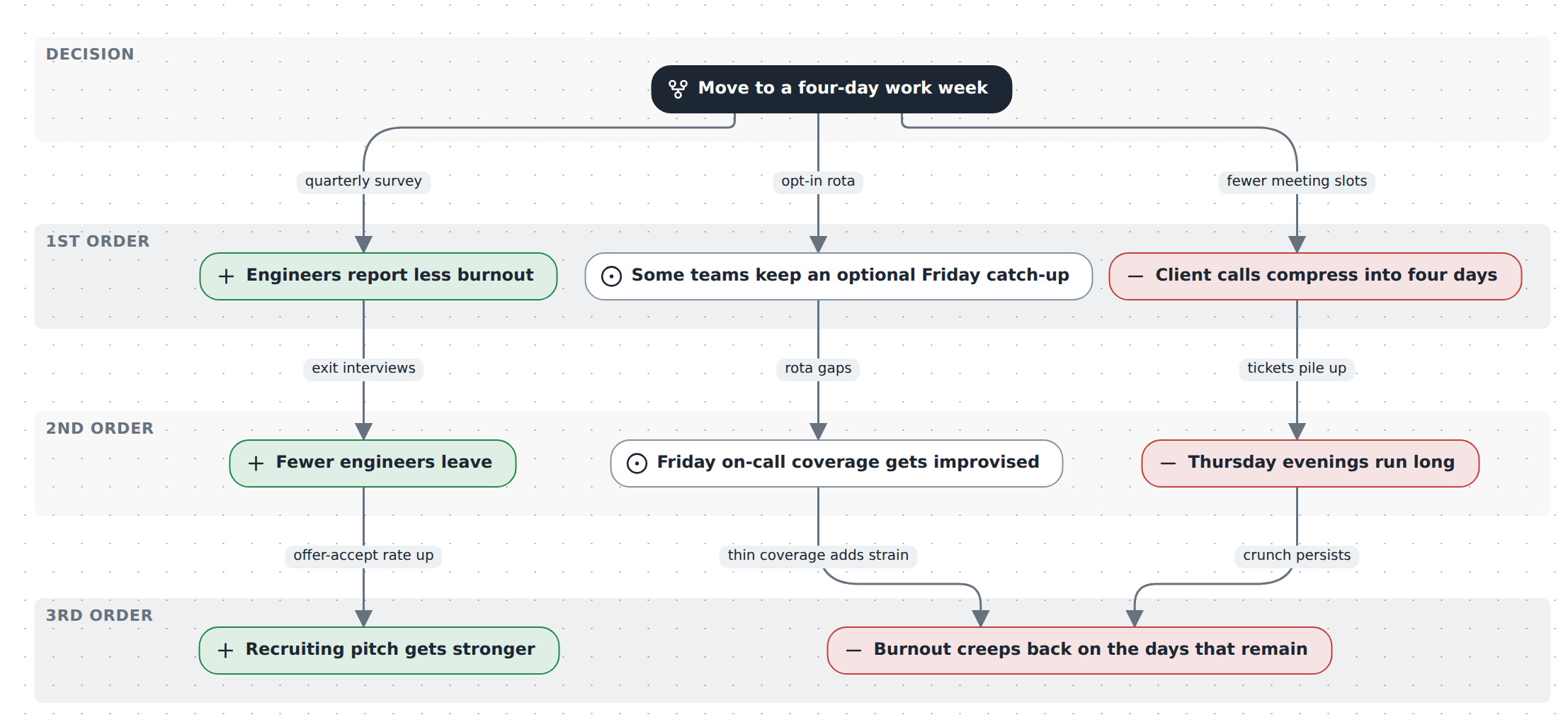
Moving to a four-day work week — a four-day-week proposal traced three orders out, from burnout and squeezed client calls through attrition, recruiting and Thursday overrun to a shared burnout rebound two branches feed. It exercises then's valence, label and description, plus leadsTo to join two branches into one consequence. Source
See also
- Builder API —
secondOrder,decision,then,leadsTo - Model reference — what the nodes and relations mean on a
second-orderplane - Publish and share — the page and the PNG work as for any diagram