Draw a fishbone diagram
Show the causes of one effect: the effect sits at the head, categories of cause hang off it as bones, and causes — and sub-causes — hang off those. A root-cause tool, in software mostly reached for during postmortems.
In the studio
- Create a new JSON diagram and, in Layers & planes, set its Notation to Fishbone (cause and effect).
- Add an effect and name it —
Enteror a click elsewhere commits it. - Start from Software, 6M or 4S for a standard set of bones, or Add a category of your own.
- Select a bone or a cause and Add a cause — or press
Tab, or click the+on the selection — to hang something on it. Type the name and pressTabagain to chain: the name is committed and the next cause opens for typing. A sub-cause takes nothing further; the button is disabled once you're that deep. - Each add is one undo step for the node and its arrow together; the typed name, once committed, is a later, separate one.
The arrangement is the notation's own: there are no layout controls, and nothing on the fish can be moved — not by dragging, the arrow keys or align. A bone ends on the spine and a cause line on its bone, not on a box, so a moved node could not take its lines along. A position saved for one by an older version is ignored, so such a diagram draws correctly again without being touched. A node that is not on the fish yet (a cause nothing hangs on, a comment) sits in a row beneath it and moves like any other box.
From TypeScript
import { model } from '@diagc/core';

const m = model('checkout-outage', { name: 'Checkout outage' });
const fb = m.fishbone('outage', 'Checkout outage on release day');
const { people, process, code } = fb.categories('Software');

people!.cause('on-call', 'On-call engineer new to checkout');
process!.cause('no-freeze', 'No change freeze on release day');
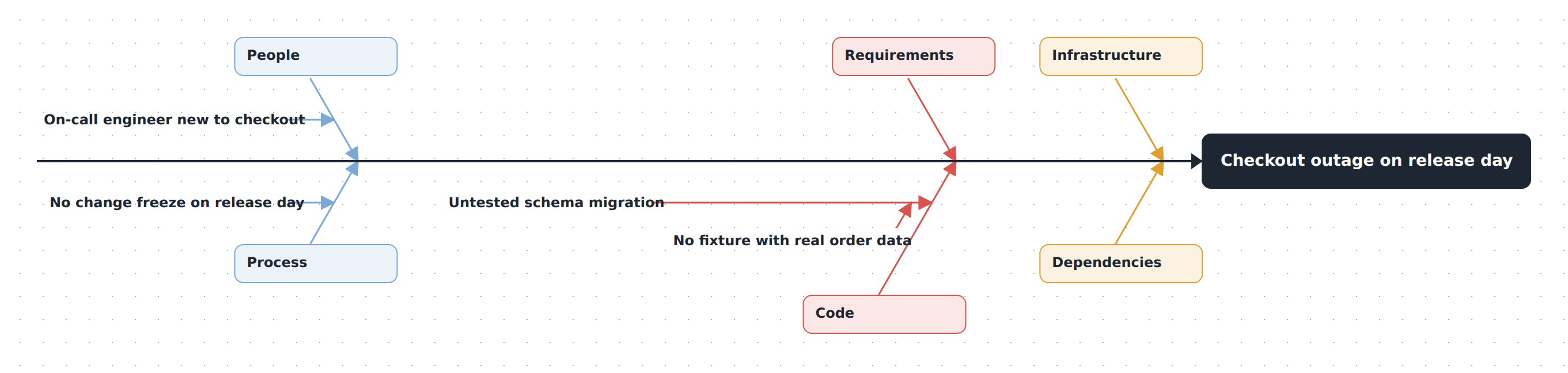
code!.cause('migration', 'Untested schema migration').cause('no-fixture', 'No fixture with real order data');

export default m;
categories() seeds a whole preset at once and returns refs keyed by slug id (presetId) — people, infrastructure, and so on — so noUncheckedIndexedAccess wants the !. A CategoryRef.cause() returns a CauseRef; calling .cause() on that adds a sub-cause, and calling .cause() again on the sub-cause throws — three levels below the effect is the limit.
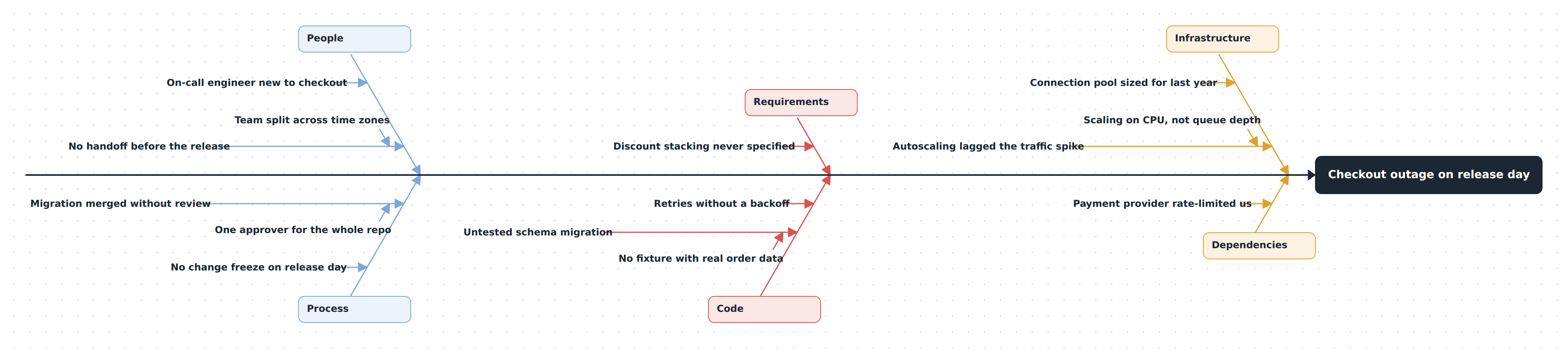
The full picture at the top of this page — all six bones of .diagrams/src/docs/fishbone.diagram.ts — builds the same way; this listing just trims it to three.
How the fish is drawn
Categories alternate above and below the spine in the order they're declared, and pair into columns left to right — the first two categories share the first column, the next two the second, and so on. Causes stack down their bone from the category box; sub-causes tick off a cause's own line. A column shares one colour.
What hangs where is never authored: any relation between two fishbone nodes hangs the child on the to end — the first such relation wins — so the connect gesture works as well as the panel does. Whatever cannot reach the effect (a stray cause, a chain that loops back on itself) waits in a row under the fish, and shows up in the panel's issue list rather than being silently dropped. It is a warning, not an error: the diagram still saves and compiles with a stray in it.
When to reach for something else
- Second-order thinking — what follows from a decision, forward in time, not the causes behind something that already happened.
- Causal-loop diagrams — feedback between causes, not a one-way tree.
Examples
Starter — the listing under From TypeScript is the whole file: three bones of the Software preset, each with one cause, one of them chained into a sub-cause. Copy it into .diagrams/src/ and change the names. Source
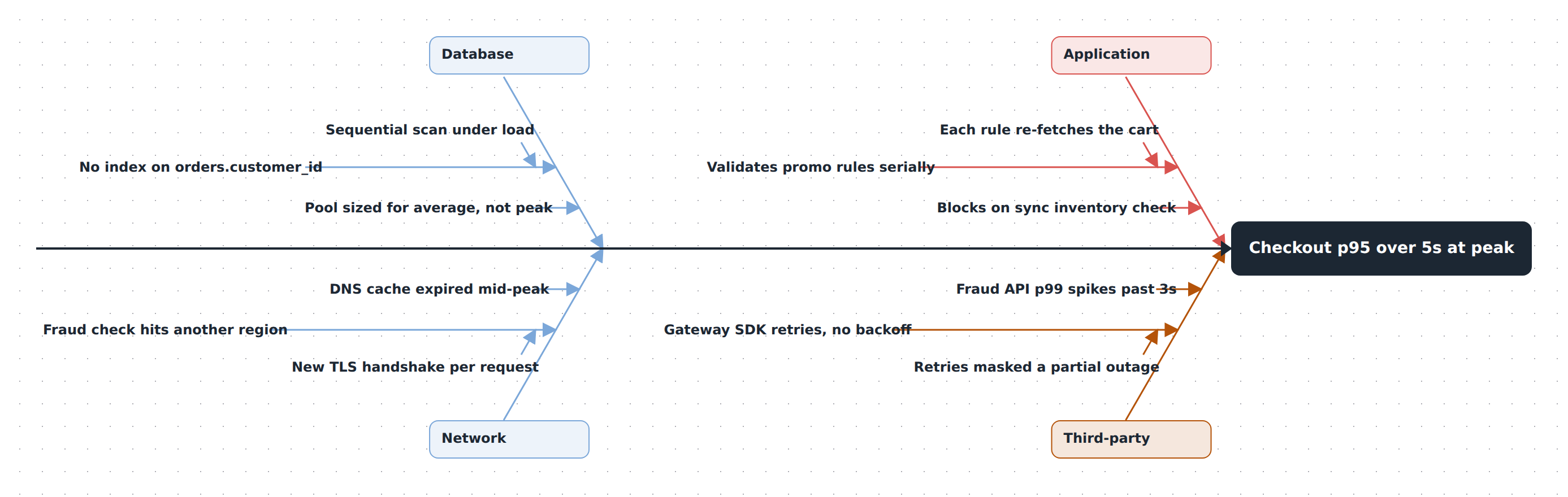
Checkout latency at peak — a slow-checkout postmortem with four hand-made bones — Database, Network, Application, Third-party — instead of a preset. It exercises fb.category(), causes chained into sub-causes on every bone, node descriptions, and a color on one category. Source
See also
- Builder API —
fishbone,category,categories,cause - Model reference — what the nodes and relations mean on a
fishboneplane - Publish and share — the page and the PNG work as for any diagram