Model reference
Every field of a compiled diagram, and every way the compiler can reject one. Source of truth: packages/core/src/types.ts, packages/core/src/validate/, and each notation's validate.ts under packages/core/src/notations/ (activity's under packages/core/src/activity/).
For why the model is shaped like this, see What is in a model.
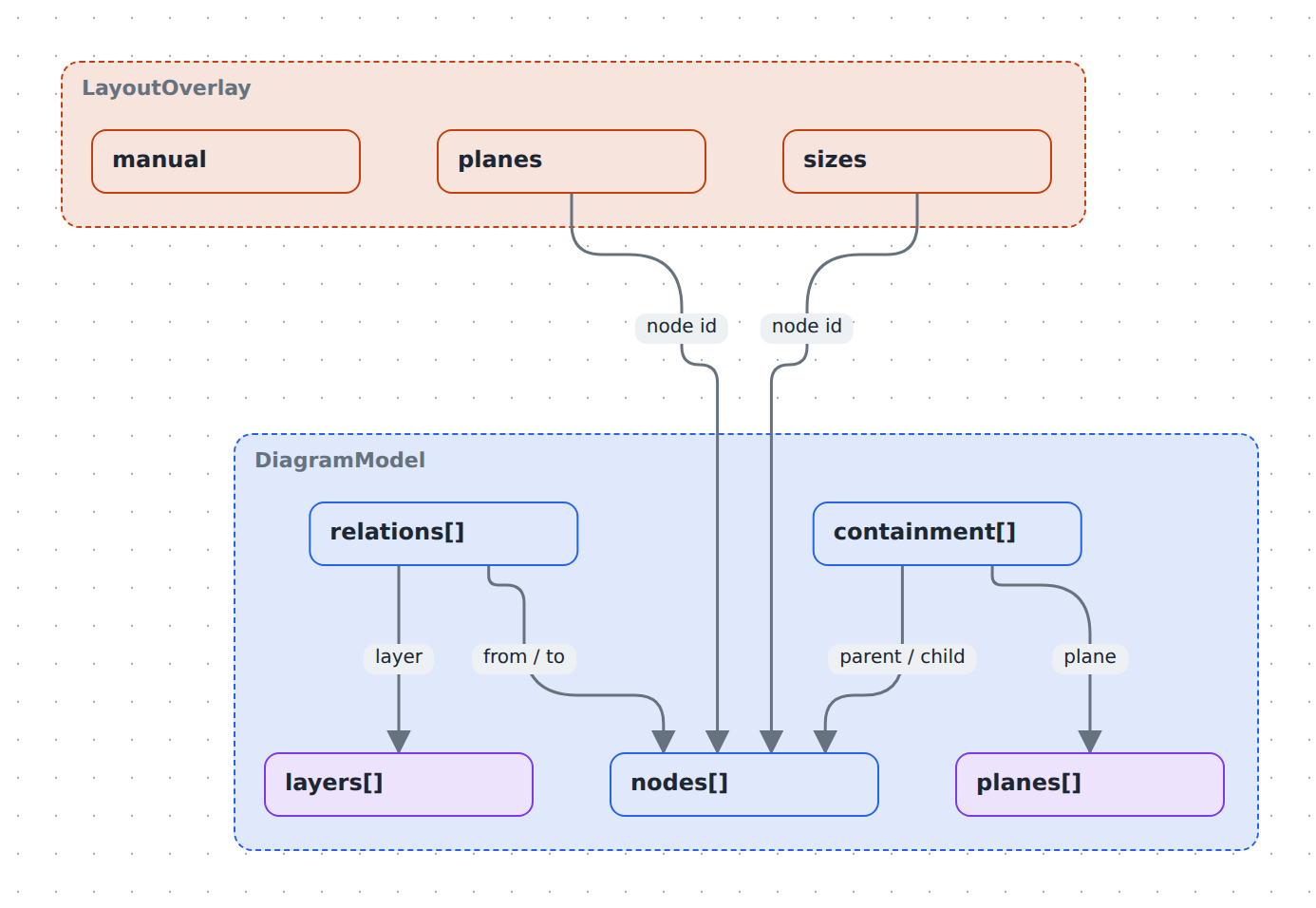
DiagramModel
| Field | Type | Notes |
|---|---|---|
version |
1 |
Required. Only value accepted. |
id |
string |
Diagram identity. |
name |
string |
Display name. |
style |
string? |
Renderer style preset pinned by this file. Unknown ids fall back to the app preference. |
notation |
string? |
Visual language for the whole diagram — built in: causal-loop (see Causal-loop conventions), git-graph, c4 (see C4 stencils), second-order (see Second-order thinking conventions), fishbone (see Fishbone conventions), threat-model (see Threat-model conventions), plan (see Plan conventions), deployment (see Draw a deployment diagram). A plane's own notation wins where one is declared; this is the fallback for planeless (or plane-silent) diagrams. Unknown ids fail validation (unknown-notation), same as an unknown plane notation. Dropped from included models on graft, same as typeColors/layerRules — the host's notation (if any) is what's drawn. |
legend |
DiagramLegend? |
Opt-in key for the diagram's visual vocabulary. Absent means no legend in an image, and none on the canvas unless the diagram is drawn in shapes that carry no words. |
typeColors |
Record<string, string>? |
Default accent colour per node type; * is the fallback. A node's own color wins. Dropped from included models on graft — the host owns the look. |
layerRules |
LayerRule[]? |
Class → layer for relations without a layer: { kind?, color?, layer }, every named field must match, first match wins, explicit layer beats the rules. Dropped from included models on graft. |
nodes |
DiagramNode[] |
|
containment |
ContainmentEdge[] |
|
relations |
DiagramRelation[] |
|
layers |
DiagramLayer[] |
|
planes |
DiagramPlane[] |
Empty means one implicit plane and no switcher. |
Style preset ids: clean (default), sketch, hand-drawn, pencil, blueprint, marker.
DiagramNode
| Field | Type | Notes |
|---|---|---|
id |
string |
Unique within the model. |
name |
string |
The label drawn on the canvas. |
type |
string? |
Free-form; resolved by the renderer's type registry. Omit for a bare label. |
icon |
string? |
Free-form; resolved by the icon registry. |
image |
string? |
Asset ref — the node renders as the picture itself. |
shape |
string? |
SVG silhouette ref, drawn as a tintable mask filled with color. Takes precedence over image. |
color |
string? |
Accent colour; overrides the type registry's look. Also wins over a notation's fill (e.g. C4's solid palette) — see Draw a C4 diagram. |
textColor |
string? |
Label colour, independent of color. |
technology |
string? |
Implementation technology, composed into the type subtitle: [Container: Java, Spring Boot]. Meaningful in any notation, not just C4. |
threats |
Threat[]? |
STRIDE findings against this node. Legal in any notation, like technology — see Threat-model conventions. |
comments |
Comment[]? |
Remarks shown in the element's bubble; any notation — see Comment. |
links |
Link[]? |
Resources listed in the bubble under the comments — see Link. |
description |
string? |
Shown in the detail panel — never on the canvas. |
rich |
TextRun[]? |
Bold/italic label runs. When present, name must equal the concatenated text. |
textAlign |
'left' | 'center' | 'right'? |
Default left. |
fontScale |
'sm' | 'md' | 'lg'? |
Default md. |
metadata |
Record<string, unknown>? |
Free-form; not validated. |
key |
string? |
Cross-diagram identity. Pattern ^[a-z0-9][a-z0-9-]*$. |
include |
string? |
URL or path to another *.diagram.json composed under this node at compile time. |
includePlane |
string? |
Which of the included diagram's planes supplies the grafted structure (default: its default plane). Meaningful only beside include; an id the included diagram doesn't declare fails composition, not validation. |
includePlanes |
boolean? |
Carry every plane the included diagram declares over too — namespaced (<include-id>/<plane-id>, name <Include>/<Plane>), notation intact — so each is viewable standalone via the plane switcher. Additive to includePlane/the default graft, which is unaffected. Meaningful only beside include. |
plane |
string? |
Restrict the node to one plane. Omit to share it across all. |
layer |
string? |
The node shows only while this layer is active. |
columns |
Column[]? |
ER-table rows; rendered when type is db-table. |
Asset refs (image, shape)
Two forms are accepted, and nothing else:
^[a-z0-9]+\.(png|jpe?g|svg|webp|gif)$— a content-hashed file in.diagrams/src/assets/.^/library/[a-z0-9-]+/[a-z0-9-]+\.(png|jpe?g|svg|webp|gif)$— a bundled library asset. Exactly one directory level, lowercase kebab-case only.
Column
| Field | Type | Notes |
|---|---|---|
name |
string |
Unique within the table. |
type |
string? |
Shown right-aligned, e.g. uuid, text. |
pk |
boolean? |
Primary-key member. |
fk |
boolean? |
Prints the FK marker. Presentation only — an fk edge is routed by its relation's fromColumn, not by this flag. |
layer |
string? |
The row shows only while this layer is active; the table itself stays on the base sheet. Must name a declared layer (unknown-layer). |
ContainmentEdge
| Field | Type | Notes |
|---|---|---|
parent |
string |
Node id. |
child |
string |
Node id. |
plane |
string? |
Absent means the model's default (first-declared) plane — not "all planes". |
A node may appear as child in several edges — containment is a DAG. Cycles are rejected per plane.
Because an absent plane resolves to whichever plane was declared first, plane declaration order is semantically significant in a multi-plane model. A plane using containmentOf borrows only the edges tagged for the plane it names.
DiagramRelation
| Field | Type | Notes |
|---|---|---|
id |
string |
Unique. The builder generates from->to#n. |
from, to |
string |
Node ids. |
kind |
string |
Free-form; resolved by the kind registry. |
label |
string? |
Legacy single label. |
labels |
EdgeLabel[]? |
Positioned labels; supersedes label when present. |
threats |
Threat[]? |
STRIDE findings against this flow — see Threat-model conventions. |
comments |
Comment[]? |
Remarks shown in the relation's bubble; any notation — see Comment. |
style |
RelationStyle? |
Per-relation visual overrides. |
description |
string? |
|
layer |
string? |
Must match a declared layer id. |
polarity |
'+' | '-'? |
Causal-loop diagrams only. Colours the link green (+) or red (-) unless style.color or a layer tint says otherwise. |
delay |
boolean? |
Causal-loop diagrams only. |
fromColumn |
string? |
FK column on from; anchors the edge to that row. |
toColumn |
string? |
Referenced column on to; defaults to the target's primary key. |
RelationStyle
| Field | Values | Default |
|---|---|---|
shape |
curved | straight | step |
curved |
color |
any CSS colour | the layer tint, then the causal-loop polarity colour |
width |
number (px) | the kind's width |
line |
solid | dashed | dotted |
the kind's line |
end |
arrow | dot | square | diamond | none |
arrow |
fromSide, toSide |
top | right | bottom | left |
unset — floats to the facing side |
animated |
boolean | the kind's setting |
curvature |
number | 0.25 |
bow |
left | right |
left |
EdgeLabel
| Field | Type | Notes |
|---|---|---|
id |
string |
|
text |
string |
|
t |
number? |
Position along the edge, 0–1. Default 0.5. |
side |
'top' | 'bottom' | 'center'? |
Default center. |
DiagramLayer
| Field | Type | Notes |
|---|---|---|
id |
string |
|
name |
string |
|
tint |
string? |
Colour for this layer's relations. |
DiagramPlane
| Field | Type | Notes |
|---|---|---|
id |
string |
|
name |
string |
|
containmentOf |
string? |
Borrow another plane's containment instead of declaring your own. |
layers |
string[]? |
Layers switched on when this plane is selected. |
baseRelations |
boolean? |
false hides untagged relations, leaving only layer arrows. |
notation |
string? |
Visual language, overriding the model's notation for this plane. Built in: causal-loop, git-graph (see Git graph conventions), c4 (see Draw a C4 diagram), second-order (see Second-order thinking conventions), fishbone (see Fishbone conventions), threat-model (see Threat-model conventions), plan (see Plan conventions). |
hides |
string[]? |
Shared node ids this plane hides; their children are promoted into their place. |
hidesTree |
string[]? |
Shared node ids this plane hides along with everything inside them (a child with another visible parent stays). |
DiagramLegend
Present only if the diagram declares one. See Add a legend.
| Field | Type | Notes |
|---|---|---|
title |
string? |
Panel heading. Default Legend. |
position |
string? |
top-left, top-right, bottom-left, bottom-right. Default bottom-right. |
show |
string[]? |
Derived sections to include, exactly: layers, kinds, types, marks. Absent means layers, kinds, marks, plus those types whose shape carries no words. Replaced, not extended. |
items |
LegendItem[]? |
Hand-written rows, appended after the derived ones. |
Derived rows come from two different places, and the difference is visible:
kindsandtypescome from the compiled view — the arrows and boxes actually drawn. They follow the active plane, the active layers and what is currently unfolded; a kind whose only arrows are behind a switched-off layer has no row. Order within the section is the built-in registry's, then alphabetical for ids it does not know.layerscomes from the model, per plane — every declared layer that something the active plane could draw carries, whether it is switched on or off, in declaration order. Folding changes nothing here: a layer row is the switch that reveals its overlay, so it has to stay put while the overlay is hidden. When the plane borrows another's containment (containmentOf), relevance is resolved against the donor plane, the same way the view is; when you have drilled into a node, it is resolved against that node's interior.markscomes from the compiled view as well — a threat badge per state on screen (open, all handled), counted the way the canvas counts it: a node's own threats, and every relation a drawn arrow stands for. A drawn table'spkandfkcolumns add the 🔑 andFKrows.
A types row is captioned with the type's subtitle, or its id. The activity and threat-model shapes and the fk, activity and data-flow kinds carry a caption in words instead (Start, Process, Foreign key: many to one); those are the rows a legend with no show lists under Elements, and one of them — or a mark — drawn on a diagram with no legend at all is what puts the ▤ button on its canvas, the panel hidden until asked for. Such a legend is never exported.
Inactive layer rows are listed greyed wherever the host can toggle them (the studio). Where nothing can — a published page, an exported PNG — they are omitted instead of shown as a row no click can change.
A kinds swatch is the kind's registry style, line ends included, tinted when every drawn arrow of that kind shares one layer tint. A types swatch is the type's shape, in the accent every drawn node of that type shares. A per-relation style.color describes one arrow rather than the kind, so it is never lifted into a row.
LegendItem
| Field | Type | Notes |
|---|---|---|
label |
string |
Required, non-empty. |
type |
string? |
Swatch drawn as this node type's shape. |
kind |
string? |
Swatch drawn as this relation kind's line. |
color |
string? |
Tints whichever swatch is drawn; on its own, a plain chip. |
icon |
string? |
Icon for a type swatch, overriding the registry's. |
An item naming a kind or type that already has a derived row recaptions that row in place, keeping its position and swatch, instead of appending a new one.
LayoutOverlay (<name>.layout.json)
| Field | Type | Notes |
|---|---|---|
version |
1 |
|
planes |
Record<plane, Record<nodeId, {x, y}>> |
Positions, per plane. |
sizes |
Record<nodeId, {w, h}>? |
Plane-independent — a node is the same size everywhere. |
manual |
Record<plane, true>? |
Planes with automatic layout switched off. |
settings |
Record<plane, LayoutSettings>? |
Per-plane automatic-layout settings. Absent means the tuned defaults. |
unfolded |
Record<plane, nodeId[]>? |
The groups each plane opens with unfolded. Written together with the positions; absent means the plane rests fully folded. A starting point — the reader folds and unfolds freely from there. |
edgeLabels |
Record<plane, Record<relationId, Record<labelId, {t, side?}>>>? |
Where a viewer slid an edge label (Alt+drag in view mode): t along the edge, side of it. Overrides the label's own position on that plane; editing the position in the model drops the entry. labelId is legacy for a relation's plain label. |
notes |
Record<plane, Record<'node:<id>' | 'relation:<id>', {dx, dy, open?: true}>>? |
A threat bubble's state in this picture: where it was dragged (an offset of its top-left from the centre of the element's count badge; 0,0 means automatic placement) and whether it is open. open is only ever true — closed is spelled by leaving it out; an automatically placed entry that is not open is dropped. Dropped when the element loses its last threat. |
export |
{ collapsed?: string[] }? |
How the PNG export differs from the interactive page. |
settings, unfolded, edgeLabels and notes are keyed by the resolved containment plane (layoutPlaneKey), the same
as planes and manual — so a plane that borrows containment with
containmentOf shares the donor's entry rather than having its own.
LayoutSettings
| Field | Type | Notes |
|---|---|---|
algorithm |
string? |
elk.algorithm: layered (default; stress on a causal-loop plane), force, stress, mrtree, radial, rectpacking. stress asks for 240px edges and has overlapping boxes pushed apart afterwards. |
direction |
string? |
elk.direction for layered: DOWN (default), RIGHT, LEFT, UP. A model that draws activity frames defaults to RIGHT instead — their lanes are horizontal bands. |
spacing |
number? |
Base node-to-node spacing in px, at every nesting level. Layers sit the same distance apart, and the gap between unconnected groups is derived from it. |
edgeRouting |
'curved' | 'orthogonal'? |
How routed edges are drawn. Both follow the layout's own waypoints, which is what keeps a line off the boxes it was steered around: curved (default) rounds the bends generously, orthogonal keeps them tight. An edge whose endpoint was placed by hand floats as a bezier either way. layered only. |
aspectRatio |
number? |
layered only. When set, elk wraps long chains onto several rows aiming at this width÷height (MULTI_EDGE wrapping). Absent = no wrapping. Unconnected groups are packed toward it too (toward 0.75, a portrait page, when absent). |
export.collapsed lists node ids to keep FOLDED in the PNG only; the interactive
page ignores it and opens the way unfolded says (fully folded when absent), so
the reader unfolds what they want. The exporter otherwise unfolds every container, which turns a view with
hundreds of leaves into an unreadable thumbnail. Folding rather than the plane's
hides is the right tool when the edges matter: a folded box still ANCHORS its
hidden children's edges, where a hidden node drops them. Ids that are not
containers have no effect.
Drawings (<name>.drawings.json)
Freehand strokes drawn with the studio's pen. A third sidecar beside the layout file — also not part of the model, and kept out of the layout file so a box nudge and a scribble never share a hunk.
| Field | Type | Notes |
|---|---|---|
version |
1 |
|
planes |
Record<plane, Stroke[]> |
Keyed by the resolved containment plane (layoutPlaneKey), exactly like LayoutOverlay.planes. |
Stroke
| Field | Type | Notes |
|---|---|---|
id |
string |
Unique within its plane bucket (k1, k2, …). |
points |
number[] |
Flat [x0, y0, x1, y1, …] in absolute flow coordinates at the top level; integers; even length ≥ 2. One point is a dot. |
color |
string? |
Any CSS color. Absent: the theme's ink (dark on light, light on dark). |
width |
number? |
Flow px. Absent: 3. |
Strokes are positional, not anchored: automatic layout can move boxes out from under them. They are shown at the top level only — a drilled-in container is laid out in its own coordinate frame. A file in which no plane holds a stroke is deleted on save rather than written empty.
{
  "version": 1,
  "planes": {
    "default": [{ "id": "k1", "points": [120, 80, 131, 84, 150, 97], "color": "#d9a520", "width": 4 }]
  }
}
Git graph conventions
A plane with notation: 'git-graph' reads ordinary nodes and relations as a branching diagram. Nothing new is stored.
| Git concept | In the model |
|---|---|
| Lane | Top-level node, type: 'branch'. Lane order = order in nodes. Colour = color, else typeColors, else a built-in palette. |
| Commit | Leaf node, type: 'commit', contained by its lane on the git plane. name is the tag ('' = untagged). metadata.gap = empty columns before it. Colour = color, else the lane's. |
| Next commit on a lane | Relation kind: 'commit' |
| Branch-off | Relation kind: 'branch', from a commit on another lane to the first commit of a new run |
| Merge | Relation kind: 'merge', from the absorbed commit to the merge commit |
| Stage | Top-level node, type: 'git-stage': a frame across every lane. metadata.from / metadata.to (commit ids; to defaults to from) give the columns it spans. name is its title, color its colour. |
A commit's column is one past every commit it follows, branches from or merges, plus its gap. The layout never fails: a cycle is cut, a commit outside every lane is parked beneath the lanes — and validation reports both (git-* codes below).
Activity diagram conventions
An activity-frame node containing activity-lane nodes reads as a UML swimlane diagram. Nothing new is stored — no notation, no plane; frames are ordinary containment, and several can share a canvas.
Node types
| Type | Shape | Default size | Notes |
|---|---|---|---|
activity-frame |
chrome (frame band) | — | Always expanded. Children must be activity-lane. |
activity-lane |
chrome (lane band) | — | Always expanded. Parent must be an activity-frame. |
activity-region |
chrome (dashed band) | — | Always expanded. Interruptible sub-area; parent must be an activity-lane if contained at all. |
activity-action |
rounded | — | |
activity-object |
box | — | |
activity-send |
send-signal | 140 × 44 | |
activity-receive |
receive-signal | 140 × 44 | |
activity-decision |
diamond | 48 × 48 | |
activity-bar |
bar | 8 × 100 | Fork/join. color ignored — drawn in the neutral stroke token. |
activity-start |
start-dot | 24 × 24 | color ignored. |
activity-end |
end-bullseye | 28 × 28 | color ignored. |
activity-note |
note | 140 × 64 |
Relation kinds
| Kind | Style | Meaning |
|---|---|---|
control |
solid | Ordinary control flow. |
object-flow |
dashed | An object (data) passing between actions. |
interrupt |
zigzag mid-jog | A signal interrupting a region. |
note-link |
dashed, no arrowhead | A note annotating another element. |
A guard is a plain relation label (e.g. [order accepted]) — there is no dedicated guard field.
Second-order thinking conventions
A plane with notation: 'second-order' reads ordinary nodes and relations as a consequence tree. Nothing new is stored — valence is a node type, not a field.
Node types
| Type | Shape | Notes |
|---|---|---|
so-decision |
solid box | The root of a tree. Several decisions can share one set of bands. |
so-consequence-positive |
tinted box, plus icon |
A good consequence. |
so-consequence-negative |
tinted box, minus icon |
A bad consequence. |
so-consequence-neutral |
plain box, dot icon |
A neutral consequence — the default valence. |
Relation kind
| Kind | Style | Meaning |
|---|---|---|
leads-to |
solid, arrow end | This leads to that. Created by the builder's then/leadsTo and the studio's "And then what?" panel. |
A node's order (which band it draws in) is never stored — it is derived as the longest path from any decision, over every relation between two second-order nodes, not just leads-to ones. See Draw a second-order thinking diagram.
Fishbone conventions
A plane with notation: 'fishbone' reads ordinary nodes and relations as a fish. Nothing new is stored.
| Type | Look | Role |
|---|---|---|
fb-effect |
the head box at the right end of the spine | The one effect. |
fb-category |
a box at the outer end of a major bone, in its column's colour | A category of cause (People, Process, …). |
fb-cause |
text on a line | A cause, or a sub-cause — which one is where it hangs. |
Relation kind cause-of, drawn from the cause to what it explains: category → effect, cause → category, sub-cause → cause. What hangs where is derived from the first relation between two fishbone nodes, whatever its kind, and never stored; three levels below the effect is the limit. See Draw a fishbone diagram.
Threat-model conventions
A plane with notation: 'threat-model' reads ordinary nodes and relations as a STRIDE data-flow diagram.
| Type | Look | Role |
|---|---|---|
tm-entity |
box | An external entity: a user, a third party, anything outside the system. |
tm-process |
ellipse, default size 150 × 90 | Something the system does with the data. |
tm-store |
top and bottom rules only, open ends, default size 150 × 56 | Where the data rests. |
tm-boundary |
dashed outline box, drawn red on this notation (over typeColors, under the node's own color) |
A trust boundary. The library stencil drops one at 320 × 220. |
Relation kind data-flow — a plain solid arrow, drawn from the source of the data to its destination. Flows are one-way; a request and its response are two relations.
Trust boundaries are containers. A boundary surrounds its elements through ordinary containment, so which boundaries a flow crosses is derived from the active plane's containment and never authored: the nearest tm-boundary above each end, or outside where there is none, and a relation whose two ends land in different boundaries is a crossing. The derivation follows the first parent by declaration order where containment is a DAG, and ignores the relation's kind — a crossing is a fact about the drawing. Because a boundary is containment, a data-flow must join two elements; one wired to a boundary itself fails validation (tm-flow-boundary).
A boundary never folds under semantic zoom — it is a line around things, not a level you drill into — so its elements and their crossings are always on screen.
Threat
threats?: Threat[] sits on a node or a relation and is legal in any notation, like technology — an existing C4 or ER diagram can be threat-modelled where it stands, or gain a threat-model plane with its own boundary containment over the same nodes. The register is derived from these lists; there is no model-wide threat array.
| Field | Type | Notes |
|---|---|---|
id |
string |
Unique within its own element's list (two elements may both have a t1). The builder and the studio synthesize t1, t2, …. |
category |
'S' | 'T' | 'R' | 'I' | 'D' | 'E' |
Spoofing, Tampering, Repudiation, Information disclosure, Denial of service, Elevation of privilege. |
title |
string |
Required, non-empty — the line the register shows. |
description |
string? |
Longer prose. Unset = none. |
severity |
'low' | 'medium' | 'high' | 'critical'? |
Unset = unrated, shown as —. |
status |
'open' | 'mitigated' | 'accepted' | 'not-applicable'? |
Unset means open — a threat counts against the open tally until it is explicitly resolved. |
mitigation |
string? |
What was done about it. Unset = none. |
Which categories apply to an element is guidance (STRIDE-per-element), not a rule — the studio offers them first and every other category behind them:
| Element | Categories offered first |
|---|---|
tm-entity |
S, R |
tm-process |
all six |
tm-store |
T, R, I, D |
data-flow |
T, I, D |
| anything else | all six |
See Draw a threat model.
Comment
comments?: Comment[] sits on a node or a relation in any notation. The canvas shows a count at the element's bottom-right corner (a quarter of the way along an arrow); clicking it opens the element's bubble — the same bubble a threat register uses — with the comments listed.
| Field | Type | Notes |
|---|---|---|
id |
string |
Unique within its own element's list. The builder and the studio synthesize c1, c2, …. |
text |
string |
Required, non-empty. |
by |
string? |
Author, free text. |
at |
string? |
YYYY-MM-DD, a real calendar day. |
Link
links?: Link[] sits on a node and lists resources — a ticket, a design doc — in the bubble under the comments. It is separate from link, the node's single navigation target behind the 🔗 badge.
| Field | Type | Notes |
|---|---|---|
label |
string |
Required, non-empty — what the bubble shows. |
url |
string |
Required, non-empty. Opened in a new tab; a host that resolves links itself (Obsidian) gets it instead. |
Validation codes: invalid-comments, comment-id, comment-text, comment-at, invalid-links (see Validation codes).
Plan conventions
A plane with notation: 'plan' is a schedule: a calendar runs left to right and the plane's containment is what is scheduled inside what. The layout owns every x (it is a date); only a top-level zone takes its y from the layout overlay.
| Type | Look | Role |
|---|---|---|
plan-zone |
a rounded bar tinted with the node's color, a thick left edge, title top-left, role chips after the title; (end − start + 1) days wide |
A phase or work item. A container: what it contains is scheduled in it — nested zones one row each (by start date) and events in its title strip, both automatic; any other node (a scheduled C4 container, a plain box) is free-form instead, wrapped into rows only until it is dragged, and stays wherever it is put after that. |
plan-event |
a 16 px diamond, name beside it | A point in time. Top-level events sit in the header with a dashed rule down the chart. |
person |
the ordinary pill | An individual actor. Listed in a roster strip above the header (left to right, wrapping into further rows); attached to zones by role relations, never containment. |
team |
the ordinary pill, a users icon |
A group actor — same deal as person, drawn in the same roster and holding roles the same way, for when a role belongs to a team rather than one individual. |
Relation kinds owns, executes, checks — drawn from the actor (a person or a team) to the zone, never as arrows: each becomes a chip on the zone (O·Alice, E·Bob, C·Chen; hover for the full name). Any other kind between zones (sync, …) draws as a dependency arrow.
| Metadata key | On | Value |
|---|---|---|
start, end |
plan-zone |
YYYY-MM-DD; end inclusive; end ≥ start |
at |
plan-event |
YYYY-MM-DD |
Dates live in metadata (the git-graph from/to pattern) so a zone is an ordinary node everywhere else. The x origin is 1 January of the earliest year in the plan; the header extends a week either side of the dated range.
See Draw a plan.
Causal-loop conventions
A plane with notation: 'causal-loop' reads ordinary nodes and relations as variables and signed links. Nothing new is stored.
| Look | Role | |
|---|---|---|
A node with no type |
bare text, no box | A variable. A typed node keeps its ordinary stencil. |
A relation with a polarity |
a bowed arrow — green for +, red for - — with its sign printed near the head |
A causal link: + moves the target the same way as the source, - the opposite way. |
A relation with delay: true |
two hash marks across the middle of the line | The effect arrives late. It changes nothing about how a loop is classified. |
kind is not read — the loop arithmetic uses only each link's ends and its polarity. The examples write influence, which draws as a plain arrow.
Loops are derived, never stored. Every closed ring among the arrows actually drawn is a loop, so a layer switched off, or a plane that leaves a variable out, changes them. Links running the same direction between two variables count as one, unsigned if their polarities disagree. An even number of - links makes a loop R (reinforcing), an odd number B (balancing), and any unsigned link makes it ?. Up to 50 loops of at most 20 variables are badged, shortest first, each badge anchored just off the top-right corner of its loop's lowest-id variable, then nudged outward until it clears the boxes and the badges already placed.
invalid-polarity and invalid-delay are checked on every relation, whatever the notation. See Draw a causal-loop diagram.
ER conventions
There is no ER notation. A schema is nodes of one type joined by relations of one kind, so tables share a plane with anything else.
| Look | Role | |
|---|---|---|
Node type db-table |
a titled box, one row per Column: marker, name, type. 30 px of header and 22 px per row; as wide as its widest row, within 160–340 px |
A table. A composite key is pk: true on more than one column; pk wins where a column is both. It draws as a table only while it is a leaf. |
Relation kind fk |
a crow's foot at the referencing end, a bar at the referenced one | A foreign key, drawn from the referencing table to the referenced one, carrying fromColumn and toColumn. |
Each end of an fk is pinned to its column's row where the edge meets a left or right border; on a top or bottom border it floats to the middle like any other relation. With no toColumn, the renderer falls back to the target's first pk column — m.fk is stricter, and throws unless the target has exactly one.
A column's fk flag prints the FK marker and nothing else: what routes the edge is the relation's fromColumn. m.fk does not set the flag; the studio's row-to-table drag does.
A column with a layer is drawn only while that layer is active, and the table shrinks by its row while it is not. Its layer gets a legend row like any other, even when no node or relation uses it. An edge anchored to a hidden row floats to the table's middle, so put an fk relation on the same layer as its column. Deleting the layer deletes its rows and the relations anchored to them; merging it retags them.
duplicate-column and invalid-columns are checked on any node that has columns, and unknown-column on any relation naming a fromColumn or toColumn — whatever the node's type or the relation's kind. See Draw an ER diagram.
Validation codes
validate() returns issues; the compiler refuses to write an artifact if there are any, and the studio refuses to save.
diagramWarnings() returns the codes marked warning below, in the same shape: they never block a compile or a save.
The compiler prints them, and the notation's panel lists them.
| Code | Means |
|---|---|
duplicate-node |
Two nodes share an id. |
duplicate-layer |
Two layers share an id. |
duplicate-plane |
Two planes share an id. |
duplicate-relation |
Two relations share an id. |
duplicate-key |
Two nodes declare the same key. |
duplicate-column |
Two columns in one table share a name. |
invalid-columns |
columns is malformed: not a list, or an entry without a string name. |
containment-cycle |
A node contains itself, transitively, within a plane. |
dangling-endpoint |
A relation names a node that does not exist. |
unknown-layer |
A layer does not match any declared layer. |
unknown-plane |
A plane does not match any declared plane. |
unknown-column |
fromColumn/toColumn names no column on that table. |
unknown-hidden-node |
hides/hidesTree names a node that does not exist. |
redundant-hide |
hides/hidesTree names a node already scoped to one plane. |
invalid-plane |
Malformed plane declaration. |
invalid-style |
style is not a non-empty string. |
invalid-legend |
Malformed legend: bad title, unknown position or section, or a bad items entry. |
invalid-image |
image matches neither asset-ref form. |
invalid-shape |
shape matches neither asset-ref form. |
invalid-key |
key breaks ^[a-z0-9][a-z0-9-]*$. |
invalid-include |
Malformed include; or includePlane/includePlanes given without include. |
unknown-notation |
notation is not a built-in id. |
invalid-polarity |
polarity is not + or -. |
git-link-endpoints |
A commit/branch/merge relation does not join two commit nodes. |
git-commit-lane |
A commit link crosses lanes, or a branch/merge link stays in one. |
git-parents |
A commit has more than one incoming commit link, or more than one incoming branch link. |
git-cycle |
The git links form a cycle. |
git-commit-outside-lane |
A commit node is not contained by a branch on the git plane. |
git-gap |
metadata.gap is neither a non-negative integer nor a string of digits. |
git-stage-span |
A git-stage node's metadata.from is missing, or its from/to does not name a commit node. |
activity-lane-parent |
An activity-lane is not contained by an activity-frame. |
activity-frame-children |
An activity-frame contains something other than an activity-lane. |
activity-region-parent |
An activity-region is contained by something other than an activity-lane. |
so-no-decision |
The diagram has second-order nodes (consequences) but no so-decision node. An empty second-order diagram is valid — every one starts there. |
so-cycle |
Consequences form a loop — a feedback loop is a causal-loop diagram, not a second-order one. |
so-unreachable |
A consequence follows from no decision. |
so-contained |
A decision or consequence sits inside a container — the notation is flat. |
fb-no-effect |
The diagram has fishbone nodes but no fb-effect. An empty fishbone diagram is valid — every one starts there. |
fb-many-effects |
A second fb-effect; a fishbone diagram has one head. |
fb-unattached |
Warning. A category or cause whose chain never reaches the effect (a cycle included). It draws in the stray row under the fish until it is connected. |
fb-misplaced |
The wrong parent for the type: a category not on the effect, a cause on the effect, the effect on anything. |
fb-too-deep |
A cause hung on a sub-cause — three levels below the effect is the limit. |
fb-contained |
A fishbone node inside a container; nothing on a fish can be grouped. |
plan-date |
A start, end or at is present but is not a real YYYY-MM-DD date. |
plan-missing |
A plan-zone lacks start or end; a plan-event lacks at. |
plan-span |
A zone's end is before its start. |
plan-nested |
A zone or event contained in a zone (on the plan plane) lies outside that zone's span. |
plan-role-target |
On a plan, a relation of kind owns / executes / checks points at something that is not a plan-zone. |
invalid-threats |
threats is not a list, or an entry is not an object. The per-threat checks below are skipped for that element. |
threat-id |
A threat has no id, or repeats one already used on the same element. |
threat-title |
A threat has no title. |
threat-category |
category is outside S T R I D E. |
threat-status |
status is present and outside open, mitigated, accepted, not-applicable. |
threat-severity |
severity is present and outside low, medium, high, critical. |
invalid-comments |
comments is not a list, or an entry is not an object. The per-comment checks below are skipped for that element. |
comment-id |
A comment has no id, or repeats one already used on the same element. |
comment-text |
A comment has no text. |
comment-at |
at is present and is not a YYYY-MM-DD date. |
invalid-links |
links is not a list, or an entry lacks a non-empty label or url. |
tm-flow-boundary |
A data-flow relation ends on a tm-boundary; flows connect elements, a boundary only surrounds them. |
invalid-delay |
delay is not a boolean. |
invalid-rich |
rich runs do not reconstruct name. |
invalid-align |
textAlign outside the allowed set. |
invalid-font-scale |
fontScale outside the allowed set. |
invalid-edge-label |
Malformed labels entry. |
Lint codes
Also returned by diagramWarnings(), so compile prints them and diagc lint fails on them. Each is a diagram that validates but probably does not say what was meant.
| Code | Means |
|---|---|
duplicate-name |
Two siblings of one type share a name (case and surrounding spaces ignored), usually one thing declared twice. Activity start, end, bar and decision glyphs are exempt. |
unknown-type |
A node's type is not in the registry or its notation's vocabulary, so it draws as a plain box. Names the closest known type when one is a likely typo. Nodes with an image or shape are exempt. Reported once per type. |
unknown-kind |
The same for a relation's kind, which draws as a plain arrow. |
unused-layer |
A layer that no node, table row, relation or layerRules entry is on. |
empty-plane |
A plane with no containment, scoped nodes, containmentOf, hides, layers, baseRelations or notation of its own: it shows every shared node flat. |
unused-legend-item |
A legend row describing a type no node has or a kind no relation has. |
undrawn-node |
A node that no plane's view includes (for example one scoped to a plane that borrows another's containment). |
undrawn-relation |
A relation between two drawn nodes that no plane shows together. |
Registry defaults
Strings the renderer already knows. Anything else falls back to a plain box or a plain line.
Node types — system, platform (dashed boxes); service (box + icon); database, aws-rds, table (cylinders); db-table (ER table); queue (pill); infra (hexagon); person (pill); comment (speech bubble — an ordinary node for remarks, wired up with normal relations); and the 33 c4-* types listed in Library reference.
Relation kinds — sync, async (dashed), reads, writes (thick), hosted-on (dashed), flow (animated), mixed (thick, used for aggregates), fk (crow's foot to bar), network and influence (plain), plus each notation's kinds in its conventions above.
An aggregate edge (one arrow standing for several relations, after a fold) labels itself from its constituents: their distinct labels joined with / while that stays within 32 characters, or a single distinct label whatever its length, and otherwise N relations. Single-relation edges always carry their own label. Long labels are ellipsised at ~24 characters when drawn; the arrow's hover title carries the full text. See Views.
Shapes — box, cylinder, pill, hexagon, table, bubble (a rounded box with a tail at the bottom-left; the tail hangs outside the node's layout box, so spacing and edge attachment behave exactly as for a box).
Icons — database, postgres, table, user, cloud, mail, service, system, queue, server, kubernetes, infra, browser, spa, mobile, desktop, api, function, cli, blob, search, component, interface, class, node, instance, comment.
See also
- Builder API — the TypeScript way to produce this.
- What is in a model — the reasoning.
- Draw on a diagram — the pen that writes the drawings sidecar.