Use planes and layers
Two mechanisms let one diagram answer several questions. They are easy to confuse, so start here:
| Plane | Layer | |
|---|---|---|
| Changes | which boxes are inside which | which arrows and nodes are visible |
| Think of it as | a different hierarchy over the same entities | a transparent overlay on top |
| Declared on | planes[], plus plane on containment edges |
layers[], plus layer on relations and nodes |
| Switched with | the plane switcher — one at a time | layer toggles — any combination |
| Default | the first plane declared | all layers off |
One sentence each:
- A plane answers "where does this live?" — the same service is inside its logical system on one plane and inside the cluster it runs on in another.
- A layer answers "what else is true?" — the structure stays put and extra arrows appear.
What they are for
| You want | Reach for |
|---|---|
| Logical ownership and physical deployment of the same services | plane |
| A team-ownership view over the same systems | plane |
| A view scoped to one product area, with everything else gone | plane (with hides / hidesTree, or plane on the nodes) |
| Data flow drawn over the architecture | layer |
| Failure and retry paths, shown only when discussing resilience | layer |
| Which calls are synchronous, on demand | layer |
| A node that only exists in one context (a build agent, a bastion) | layer on the node, or plane on the node |
| Detail hidden until someone asks for it | neither — semantic zoom already does that |
If you are declaring a plane whose containment is identical to another's, you actually wanted containmentOf plus a layer.
A worked example
One model, three views. The full source is .diagrams/src/docs/planes.shared.ts.
The entities, declared once
const shop = m.node('shop', { type: 'system', name: 'Shop' });
const billing = m.node('billing', { type: 'system', name: 'Billing' });
const web = m.node('web', { type: 'service', name: 'Storefront' });
const orders = m.node('orders', { type: 'service', name: 'Orders API' });
const payments = m.node('payments', { type: 'service', name: 'Payments API' });
const db = m.node('db', { type: 'database', name: 'Orders DB' });

const k8s = m.node('k8s', { type: 'infra', icon: 'kubernetes', name: 'K8s cluster' });
const rds = m.node('rds', { type: 'aws-rds', name: 'RDS' });
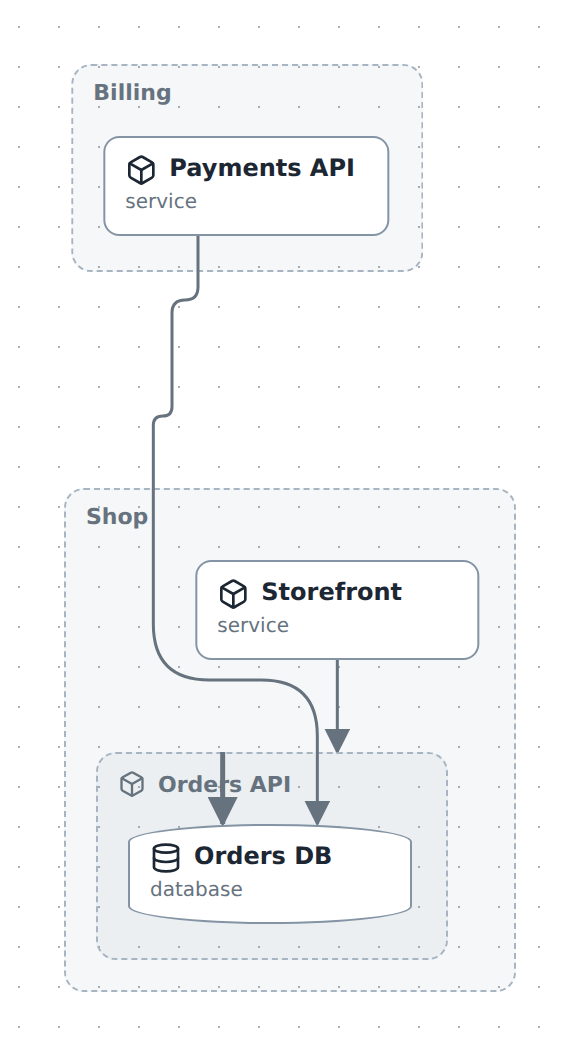
Plane 1 — architecture: who owns what
m.plane('architecture', { name: 'Architecture', hides: ['k8s', 'rds'] });

shop.contains(web, orders, { plane: 'architecture' });
billing.contains(payments, { plane: 'architecture' });
orders.contains(db, { plane: 'architecture' });
Plane 2 — infra: where it runs
m.plane('infra', { name: 'Infrastructure', hides: ['shop', 'billing'] });

k8s.contains(web, orders, payments, { plane: 'infra' });
rds.contains(db, { plane: 'infra' });
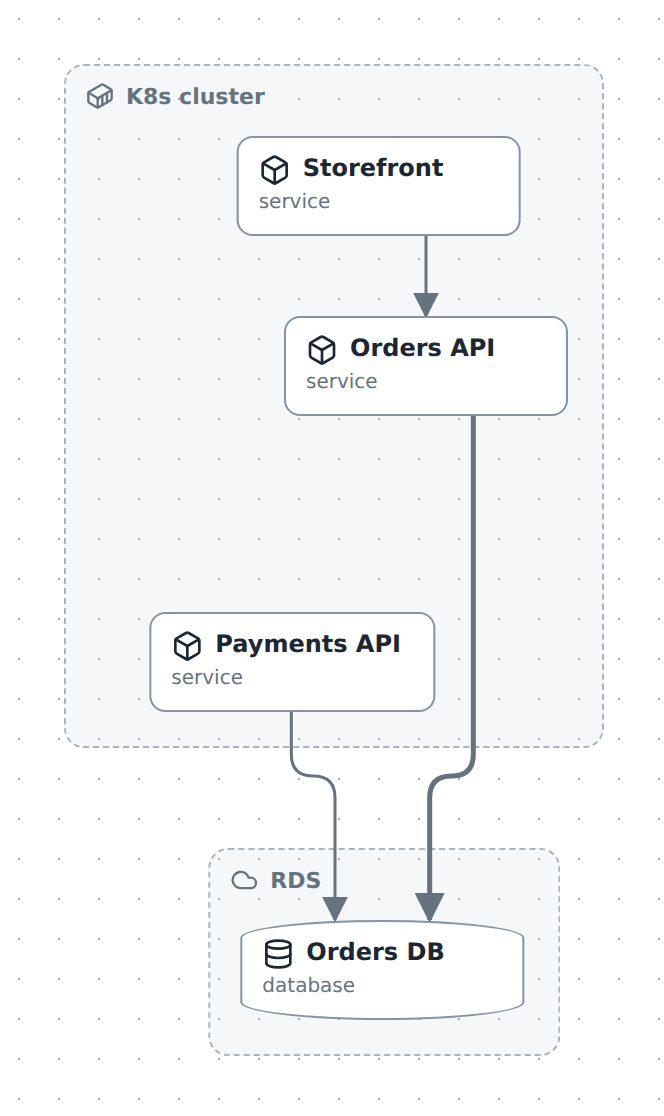
Same six entities. Nothing is duplicated — only the containment edges differ. Storefront is inside Shop on one plane and inside K8s cluster on the other.
Note the hides on each plane: K8s cluster has no containment in the architecture plane, so without hides it would drift in as an empty box. See Keep a plane clean below.
Plane 3 — data flow: the architecture, plus an overlay
m.layer('data-flow', { name: 'Data flow', tint: '#0ea5e9' });

m.relate(orders, payments, { kind: 'flow', label: 'order placed', layer: 'data-flow' });
m.relate(payments, web, { kind: 'flow', label: 'receipt', layer: 'data-flow' });

m.plane('flow', {
  name: 'Data flow',
  containmentOf: 'architecture',   // reuse that hierarchy, do not redeclare it
  layers: ['data-flow'],           // with this overlay already on
  baseRelations: false,            // and the ordinary arrows hidden
});
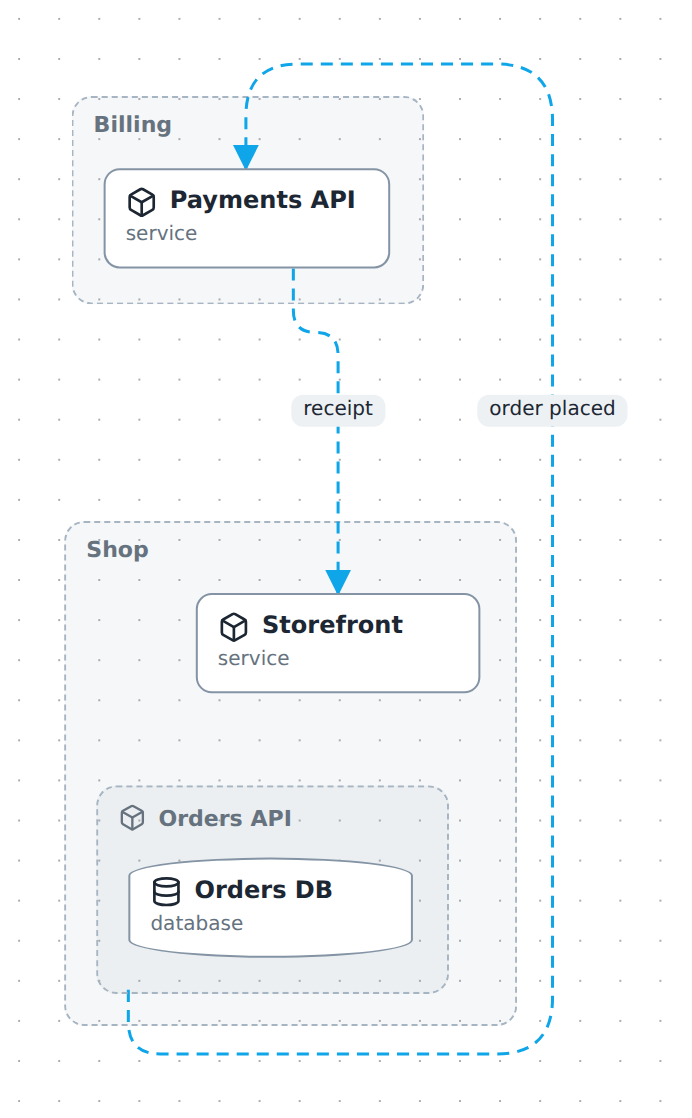
Same boxes as the architecture plane, because it borrowed that structure. The writes, reads and sync arrows are gone; only the two blue layer arrows remain.
Those three options are the whole trick, and they compose:
| Option | Effect |
|---|---|
containmentOf: 'architecture' |
Do not declare containment — borrow it (the donor's hides/hidesTree come along, unless this plane declares its own) |
layers: ['data-flow'] |
This layer is on by default in this plane. Hosts with a layer switch (diagc studio, a published page) start from this and can turn them off |
baseRelations: false |
Hide untagged relations, leaving only layer arrows |
Recipes
Add an overlay to an existing diagram
m.layer('retries', { name: 'Retries', tint: '#dc2626' });
m.relate(orders, payments, { kind: 'async', label: 'retry 3×', layer: 'retries' });
That is all. The layer is off by default, so nothing changes until someone switches it on. Layout is computed from the full relation set, so toggling it moves no boxes.
Show a node only on one overlay
m.node('bastion', { type: 'infra', name: 'Bastion host', layer: 'ops' });
The node appears only while the ops layer is active — same rule as relations.
Restrict a node to one plane
m.node('k8s', { type: 'infra', name: 'K8s cluster', plane: 'infra' });
The node exists only in that plane. Use this for containers that are meaningless elsewhere — but note it does not compose with containmentOf: a node pinned to architecture will not appear in a plane that merely borrows architecture's structure. For that case use hides on the other planes instead, which is what the worked example does.
Keep a plane clean
A node with no containment in the active plane does not disappear — it becomes a root, floating in as an empty box. Two ways to deal with it:
m.plane('architecture', { name: 'Architecture', hides: ['k8s', 'rds'] });   // per plane
m.node('k8s', { type: 'infra', name: 'K8s cluster', plane: 'infra' });      // per node
hides is for nodes shared across planes. Listing a node that already has plane set is a redundant-hide validation issue.
hides keeps what was inside the box: the children move up to where the box was. That is usually what you want for a framing box, and it is what composition relies on. When you meant "and everything in it", use hidesTree:
m.plane('landscape', { name: 'Landscape', hidesTree: ['orders-db'] }); // the database AND its tables
Hiding a box with hidesTree hides what is inside it, unless something visible still contains it — so one entry on a store removes its tables too, while a table a second, visible store also contains stays. Hiding also drops the hidden nodes' arrows, which is the reason to reach for it when a view is unreadable from edge density; export.collapsed only folds, and a folded box still anchors its children's arrows.
Preset a reviewer's starting view
m.plane('security', {
  name: 'Security review',
  containmentOf: 'architecture',
  layers: ['authn', 'secrets'],
  baseRelations: false,
});
Anyone who picks that plane lands with exactly the two overlays on and nothing else in the way.
Layer relations you did not author
A composed diagram (include) cannot edit the relations it grafts — but it can layer them by class with layerRules, and then treat each class as an overlay:
m.layer('http', { name: 'HTTP', tint: '#ef6c00' });
m.layer('sql', { name: 'SQL', tint: '#2e7d32' });
m.layer('storage', { name: 'Queues / object storage', tint: '#8e24aa' });
m.layerRules([
  { color: '#ef6c00', layer: 'http' },
  { kind: 'sql', layer: 'sql' },
  { kind: 'fk', layer: 'sql' },
  { color: '#8e24aa', layer: 'storage' },
]);
m.plane('data', { name: 'Where the data lives', layers: ['sql', 'storage'], baseRelations: false });
Rules match on kind and/or style.color (every field a rule names must match; first match wins) and only touch relations that have no layer of their own. Combined with layers presets and baseRelations: false, one plane per question falls out of a single dense model: the data plane above draws SQL and storage and nothing else, while a context plane presets ['nats','http'] over the same boxes. Rules are the host's — an included model's rules are dropped on graft, exactly like typeColors.
In the studio
Open the Layers & planes drawer from the edit-mode toolbar.
- Add a layer — id, name, tint. It appears immediately as a toggle.
- Add a plane — id, name, whether it borrows another plane's containment, and which layers it presets.
- Switch planes with the plane switcher in the header. Your place is kept: the groups containing whatever you were looking at open automatically in the new plane.
- Toggle layers from the layer chips. Arrows appear and disappear; boxes never move. Switching plane re-seeds the chips from that plane's
layers, discarding your previous plane's choice — deliberately, since a viewpoint's presets are part of what the viewpoint means. - On a published page the same switch lives on the legend's LAYERS rows, which are clickable there (the page needs a legend that shows the
layerssection — see Add a legend).
When you drag a node into a new parent, the containment edge is created on the plane you are currently viewing. Switch to the plane you mean to edit before rearranging.
Gotchas
- Untagged containment belongs to the first-declared plane.
shop.contains(web)with no{ plane }is not "on every plane" — it is on the default one. In a diagram with several planes, tag containment explicitly, or reordering yourm.plane(...)calls will silently change what the diagram means. containmentOfborrows edges tagged for that plane. If your architecture edges are untagged andarchitectureis not declared first, a plane borrowingarchitecturegets nothing and every node floats loose.- A borrowing plane inherits the donor's
hidesandhidesTree, and overrides either by declaring it —hidesTree: []on the borrower keeps the detail the donor drops. That is how one model carries a stripped-down overview plane and a full one over the same hierarchy. - A node with no containment in a plane becomes a root, not a hidden node — an empty box, not an absence. Use
hidesor a node-levelplane. hidespromotes the interior,hidesTreeremoves it. Hiding a box withhideslifts its children into its place; layers behave the same way, so a box on an inactive layer leaves its children floating as roots.- Relations vanish with their endpoints. If a node is not in the active plane, arrows touching it are not drawn.
- Layers are off by default; a plane's
layersare on by default — including in exported PNGs, which have no switch at all. That is how the data-flow image above exists. On an interactive page or in the studio the presets are a starting point, not a floor: the switch is seeded from them when the view opens and on every plane change, and the reader can then turn any of them off. Turn one off and switch planes and back to get the presets again. baseRelations: falsehides untagged relations only. Relations on other layers still appear if those layers are on.- Layer toggles never move boxes. If yours do, something else changed — layout is computed from the full relation set on purpose.
See also
- Add a legend — the reader-facing half of layers. A tint means nothing to someone who did not author the diagram; a legend names it, and is what carries that meaning into a committed image
- Organise a large diagram — semantic zoom and pins, the other half of keeping things readable
- What you see is not what is stored — how the view compiler resolves all this
- Builder API reference — every plane and layer option