Draw a threat model
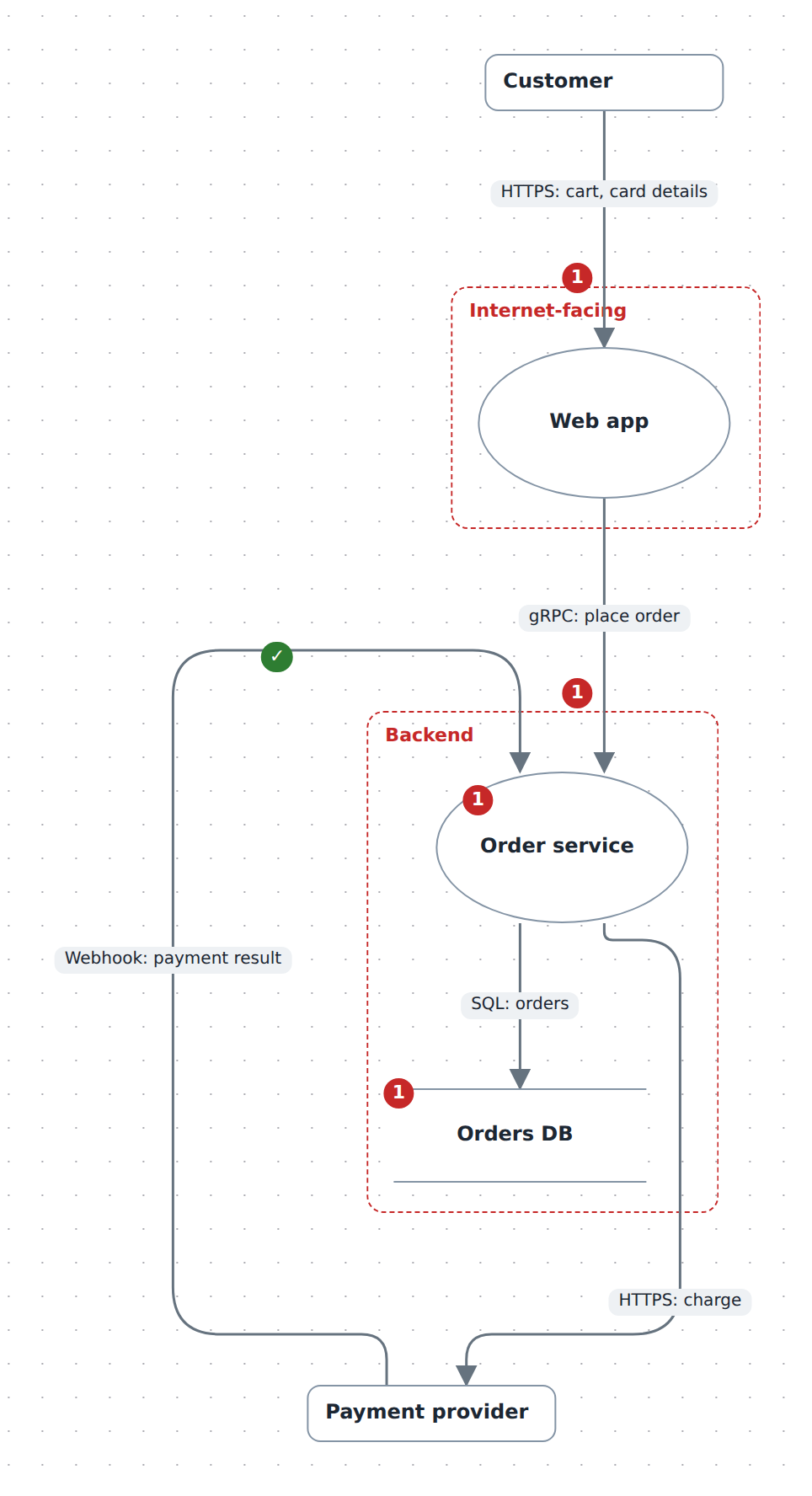
A STRIDE data-flow diagram: the external entities, processes and data stores your system moves data between, the flows between them, and the trust boundaries those flows cross. Every element and every flow can carry threats — one STRIDE finding each, with a severity, a status and a mitigation — so the register travels in the diagram file instead of a spreadsheet beside it.
In the studio
- Create a new JSON diagram and, in Layers & planes, set its Notation to Threat model (STRIDE).
- In the Library tab's Threat model section, drag out External entity, Process, Data store and Trust boundary. A dropped boundary is an empty red dashed box.
- Put an element inside a boundary from the element's own panel: Memberships → Choose parent… → the boundary → Add. Dragging a box into a boundary only moves it; the picker is what changes containment.
- Drag from a connect dot to another element to draw a flow. On this notation the new relation arrives as
data-flow, which is the kind that matters: it is what makes the Threats section offer a flow's categories (tampering, information disclosure, denial of service) first, and what lets validation catch a flow wired to a boundary instead of to an element. Change a relation's Kind away fromdata-flowand it stops being read as a flow. The+on a selected element adds a flow to a new process; on a boundary it adds a process inside. - Select an element or a flow and use its Threats section: pick a STRIDE category, type the threat, and Add (
Enterdoes the same). Each row then carries a severity (—, low, medium, high, critical), a status (open, mitigated, accepted, not-applicable), a ▸ details disclosure for the description and the mitigation, and Remove. Every change is one undo step. - Or on the canvas: click the grey
+at the element's corner (or on the flow), type the title,Enter. The bubble that opens lists the element's threats; its own+adds the next, a double-click retitles, the status word advances the status,▸opens the description and mitigation for writing, and you can drag the bubble wherever it reads best — its tail keeps pointing at the badge. Click the count badge to close the bubble, or to open it again later. - On a flow, the Threats section's first line reads Crosses: from → to — the two boundaries its ends sit in,
outsidewhere there is none. Nothing declares that; it is read off the containment you built in step 3. - The Threat model panel on the right has the two lists a review runs on: Crossings to review — every boundary-crossing flow with no threat recorded yet, each clickable to select it — and the Register, every threat in the diagram grouped by the element that carries it. Validation problems with the threats show under Issues.
The panel is there in view mode too: a read-only .diagram.ts threat model still gets its register.
From TypeScript
import { model } from '@diagc/core';

const m = model('checkout');
const tm = m.threatModel();

const customer = tm.entity('customer', 'Customer');
const web = tm.process('web', 'Web app');
const orders = tm.process('orders', 'Order service');
const db = tm.store('db', 'Orders DB');

tm.boundary('edge', 'Internet-facing').contains(web);
tm.boundary('backend', 'Backend').contains(orders, db);

tm.flow(customer, web, 'HTTPS: cart, card details')
  .threat({ category: 'S', title: 'Credential stuffing on login', severity: 'high' })
  .threat({
    category: 'I',
    title: 'Card details logged by the CDN',
    severity: 'critical',
    status: 'mitigated',
    mitigation: 'PCI-scoped log scrubbing',
  });

tm.flow(web, orders, 'gRPC: place order');
tm.flow(orders, db, 'SQL: orders');

orders.threat({ category: 'E', title: 'Admin refund endpoint lacks role check', severity: 'high' });

export default m;
entity, process, store and boundary hand back ordinary NodeRefs, so contains, relate, layer and the rest of the builder work on them unchanged; flow hands back a FlowRef, which exists so a threat can hang off the flow. A threat's id defaults to t1, t2, … within its own element, and an unset status means open.
.threat() is on every node ref, not just the four DFD ones — an existing C4 or ER diagram can be threat-modelled where it stands. Give m.threatModel({ plane: 'threats' }) a plane and the notation, and the boundary containment that goes with it, live on that plane beside the architecture's own view.
The full picture at the top of this page is .diagrams/src/docs/threat-model.diagram.ts; this listing trims it.
How threats are shown
A count badge sits on any element or flow that carries threats: red with the number of open ones, or a green ✓ once every threat on it is mitigated, accepted or ruled not applicable. The badge says how much is outstanding; click it and a speech bubble says what — the element's name and its open / total, then each threat as its STRIDE letter, title and status, with ▸ for the description and mitigation. A handled threat is muted. The bubble opens next to its badge, tail pointing at it, on the nearest spot that covers no box, no container title and no threat-bearing flow — above-left of the badge by preference, then around the element, each spot nudged outward until it is clear; when every spot nearby is taken it covers as little as it can rather than moving away. A flow's bubble keeps to its badge's side of the line. Drag a bubble and it stays where you put it, measured from its badge, however the rest of the picture moves. Bubbles are part of the picture: the ones left open travel into the published page and the PNG, and a reader of the published page can open and close them too. The studio's Notes chip opens or closes them all.
The published page still carries the full detail: under the canvas, a Threats: n open of m panel opens on a table of every threat in the model — element, the boundaries a flow crosses, the STRIDE category, the title, severity, status and mitigation.
Both the table and the studio's register are derived from the same model, in the same order (elements first, then flows, each in declaration order), so neither can disagree with the drawing.
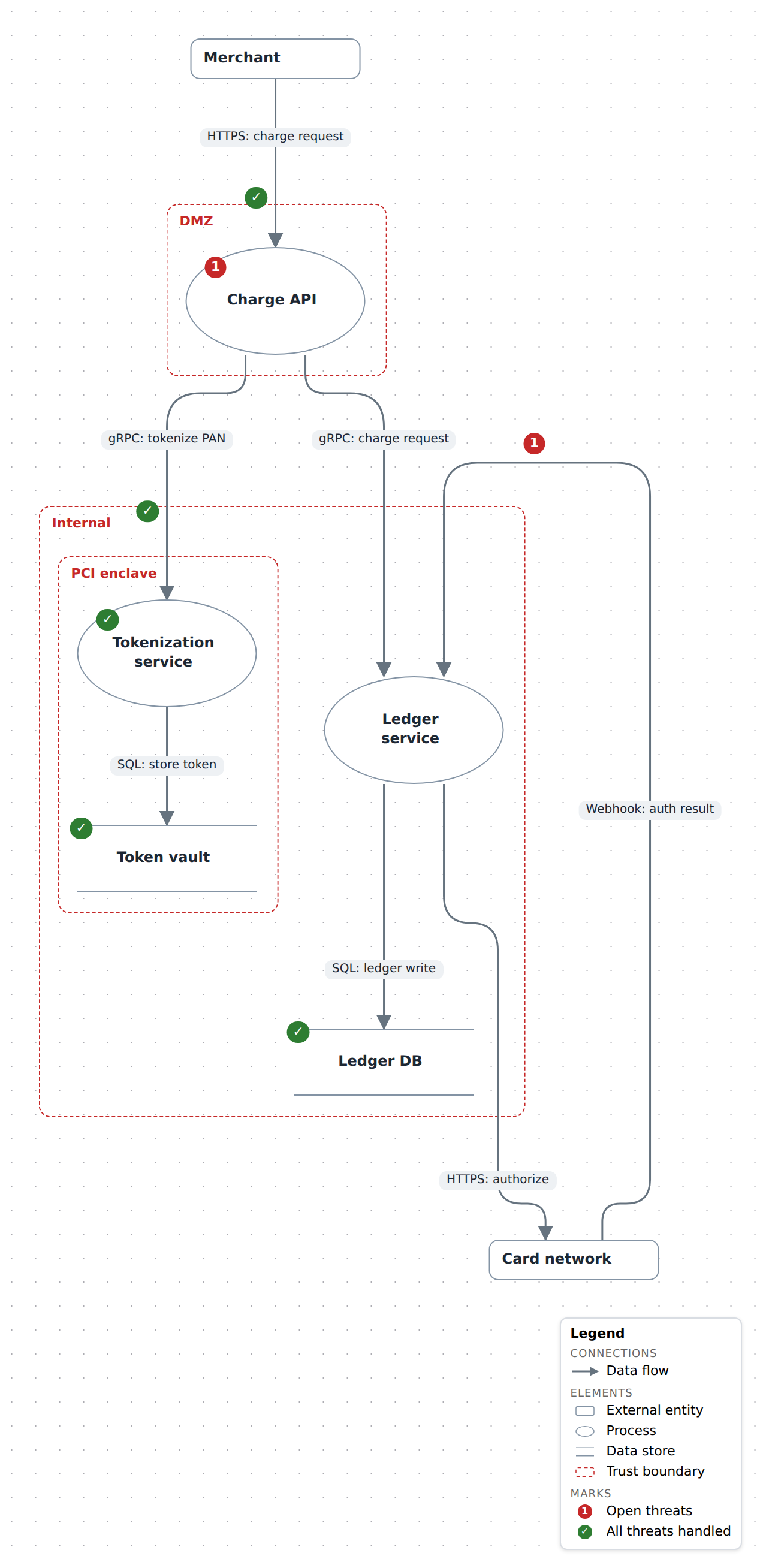
The shapes and both badge states are keyed in the legend, which ▤ brings up whether or not the file declares one. Call m.legend() to have it start shown and travel into the PNG; see Add a legend.
When to reach for something else
- C4 — the architecture itself: who the system serves, what it is built from, what talks to what. A threat model is what you draw about that, and a
threat-modelplane can sit beside it on the same nodes. - Fishbone — the causes of an incident that already happened, rather than what an attacker could still do.
Examples
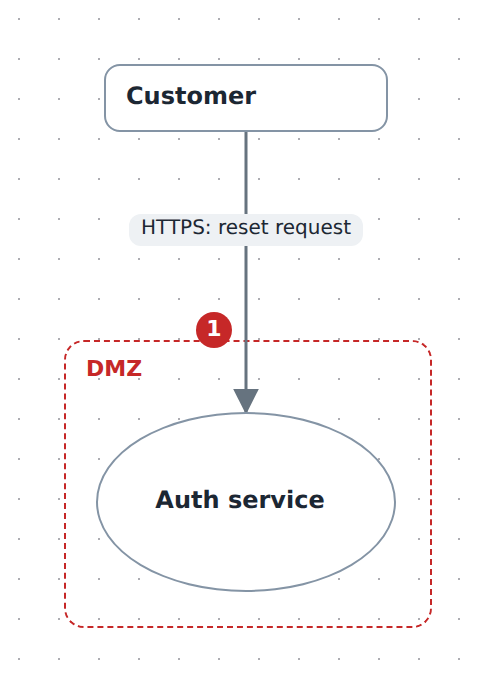
Starter — a customer requesting a password reset from an internet-facing auth service, with one information-disclosure finding on the flow. Copy it into .diagrams/src/ and change the names.
import { model } from '@diagc/core';

const m = model('password-reset', { name: 'Password reset flow' });
const tm = m.threatModel();

const customer = tm.entity('customer', 'Customer');
const auth = tm.process('auth', 'Auth service');
tm.boundary('internet-facing', 'DMZ').contains(auth);

tm.flow(customer, auth, 'HTTPS: reset request').threat({
  category: 'I',
  title: 'Reset token leaks to third parties via the Referer header',
  severity: 'medium',
});

export default m;
Payments API — a merchant-facing charge API that tokenizes cards in a PCI enclave nested inside an internal boundary, writes to a ledger, and settles with an external card network. Threats sit on both nodes and flows, with severity, status and mitigation mixing open, mitigated and accepted findings. Source
See also
- Builder API —
threatModel,entity,process,store,boundary,flow,threat - Model reference — the element types,
Threatand its defaults, the validation codes - Studio reference — the Threats section and the Threat model panel
- Publish and share — the page and the PNG work as for any diagram