Draw an activity diagram
Show a workflow as a UML activity diagram: swimlanes of actions, forks and joins, decisions, and signals passing between actors — an activity frame containing lanes, each lane containing the elements that actor performs.
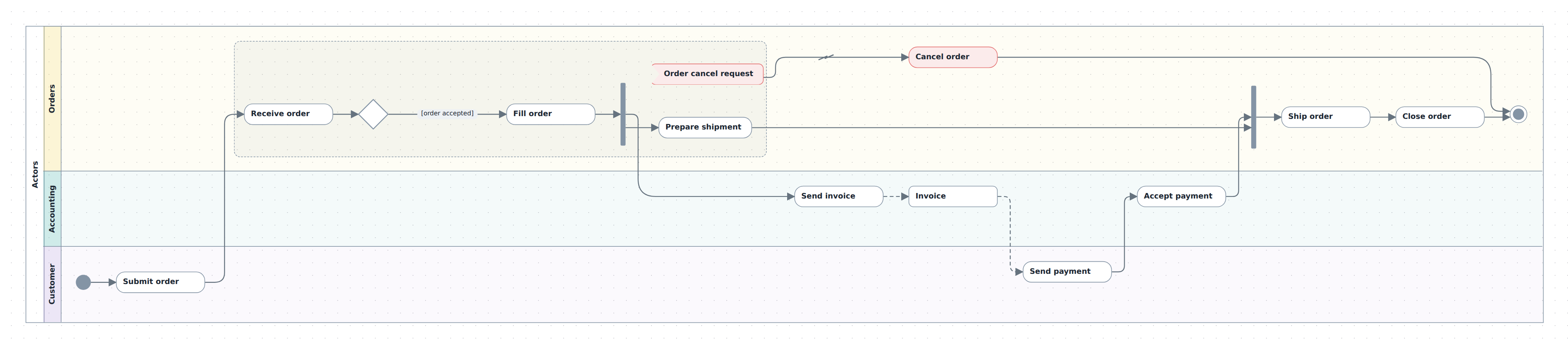
A frame's children must be lanes; a lane's children are the flow (actions, objects, signals, decisions, fork/join bars, start/end, notes) plus, optionally, one or more interruptible regions, each hosting that same set of flow elements (a region does not nest further regions). A canvas can hold several frames — m.activity() is repeatable, and frames are ordinary containers on whatever plane the model uses, no notation required.
In TypeScript
Declare the frame, then its lanes top to bottom:
import { model } from '@diagc/core';

const m = model('docs-activity', { name: 'Order processing' });
const act = m.activity('actors', { name: 'Actors' });
const orders = act.lane('orders', { name: 'Orders', color: '#f6d55c' });
const accounting = act.lane('accounting', { name: 'Accounting', color: '#3caea3' });
const customer = act.lane('customer', { name: 'Customer', color: '#b39ddb' });
Fill each lane with elements.
action,object,sendandreceiveall take an id and a name;decision,bar,startandendare unlabelled and auto-id if you don't name one;region()(lanes only) nests an interruptible sub-area that hosts the same element helpers:const start = customer.start(); const submit = customer.action('submit-order', 'Submit order'); const region = orders.region('cancelable'); const cancelReq = region.receive('cancel-request', 'Order cancel request', { color: '#e57373' }); const receive = region.action('receive-order', 'Receive order'); const accepted = region.decision('accepted'); const fill = region.action('fill-order', 'Fill order'); const fork = region.bar('fork'); const prepare = region.action('prepare-shipment', 'Prepare shipment'); const join = orders.bar('join'); const ship = orders.action('ship-order', 'Ship order'); const close = orders.action('close-order', 'Close order'); const cancel = orders.action('cancel-order', 'Cancel order', { color: '#e57373' }); const end = orders.end(); const invoice = accounting.object('invoice', 'Invoice'); const sendInvoice = accounting.action('send-invoice', 'Send invoice'); const accept = accounting.action('accept-payment', 'Accept payment'); const pay = customer.action('send-payment', 'Send payment');Auto-ids follow
${scopeId}-<suffix>, then-2,-3, … per scope and suffix —orders.bar()twice in the same lane givesorders-barandorders-bar-2.Wire the flow.
flowdraws a solid control arrow,objectFlowa dashed one for data passing between actions,interrupta zigzag from an interrupting signal, andnoteLinka headless dashed line from a note to what it annotates. A guard is just a relation label:act .flow(start, submit) .flow(submit, receive) .flow(receive, accepted) .flow(accepted, fill, '[order accepted]') .flow(fill, fork) .flow(fork, prepare) .flow(fork, sendInvoice) .flow(prepare, join) .flow(join, ship) .flow(ship, close) .flow(close, end) .objectFlow(sendInvoice, invoice) .objectFlow(invoice, pay) .flow(pay, accept) .flow(accept, join) .interrupt(cancelReq, cancel) .flow(cancel, end); export default m.toJSON();diagc compile, then open it in the studio or publish it.
The whole picture above is .diagrams/src/docs/activity.diagram.ts in this repo.
In the studio
- Drag an Activity frame off the palette (UML · Activity category) onto the canvas. It arrives with one lane, Lane 1.
- Add more lanes: select a lane and click the
+on its top or bottom edge for a new lane right above or below it (Tabadds below), then type its name. Or use the Activity panel, which shows whenever anything in the frame is selected (or always, when the diagram has one frame): it lists the frame's lanes top to bottom, and a name typed under the list plus Add lane (orEnter) puts a new one at the bottom. To reorder, drag a lane by its name strip and let go once its middle is past the neighbour's, or use the ↑ / ↓ beside it in the panel's list; its elements travel with it. Clicking a lane's name in the list selects it. - Put elements in a lane: drag one off the palette and drop it where you want it — dropped on the frame, it goes into the lane under the pointer; dropped on another element, it goes beside it in that element's lane. Or select a lane, a region, or any element in one, and use the panel's Elements, which says which lane it is adding to: an optional name field plus one quick-add button per leaf type (action, decision, fork/join bar, start, end, send signal, receive signal, object, note), and, on a lane, Add region for an interruptible sub-area.
Ctrl/Cmd+C/Vcopies elements (or whole lanes) and pastes them into the selected lane. - Connect elements by dragging from one to another, the same gesture as any diagram. New connections start as a plain
syncrelation; select the arrow and set its Kind tocontrol,object-flow,interruptornote-linkto match what it means. Give it a Label like[order accepted]for a guard. - Rename, recolour and delete lanes, regions and elements the same way as any node. To move an element to another lane, use the node panel's Memberships section: remove its current lane (✕), then pick the new one under Choose parent… and Add. The list offers only lanes and regions (a lane's only frames), and dragging an element across a lane boundary does not re-home it.
What to know
- Bars, start and end ignore
color. They draw in a neutral stroke token regardless of what the node sets — there's no per-node colour on fixed UML glyphs in v1. - Lane order is declaration order, same as git-graph lanes. Dragging a lane, or its ↑ / ↓ in the panel's lane list, rewrites that order; a lane has no position of its own, so a drag that crosses no neighbour's middle just snaps back. The panel's Tidy lane order (shown from three lanes) suggests the order whose links cross the fewest other lanes and applies it as one undoable step; the layout never reorders lanes on its own, since the order usually means something. It only searches frames of up to eight lanes.
- Links between lanes are drawn at right angles, through the empty columns between steps and the blank strips along each lane's edge, so they stay off boxes and captions. A link pinned to a side keeps it. One the router can't place still draws as a curve.
- Names of decisions, bars, start and end sit under the glyph, and the layout leaves room for them.
- Loose elements are legal. A leaf dropped or created with no lane, or a region with no parent at all, doesn't fail validation — it just doesn't draw as part of the frame. Home it with the node panel's containment editor (its Memberships section), the same path any other stray node uses. A region contained by something other than a lane, though, is a validation error (
activity-region-parent) — "unparented" and "wrongly parented" are different things. - Rules the compiler and the studio's save both enforce, each with a validation code: an activity frame's children must all be lanes; a lane must be contained by a frame; a region must be contained by a lane if it's contained by anything at all.
- The key is one click away.
▤lists what each glyph and line means —Start,Decision / merge,Fork / join,Control flow— whether or not the file declares a legend. Callm.legend()to have it start shown and travel into the PNG; see Add a legend. - No semantic checking. Decision fan-out, token conservation, whether a fork's branches ever join — none of that is verified. This is an illustrative tool, not a UML checker.
Examples
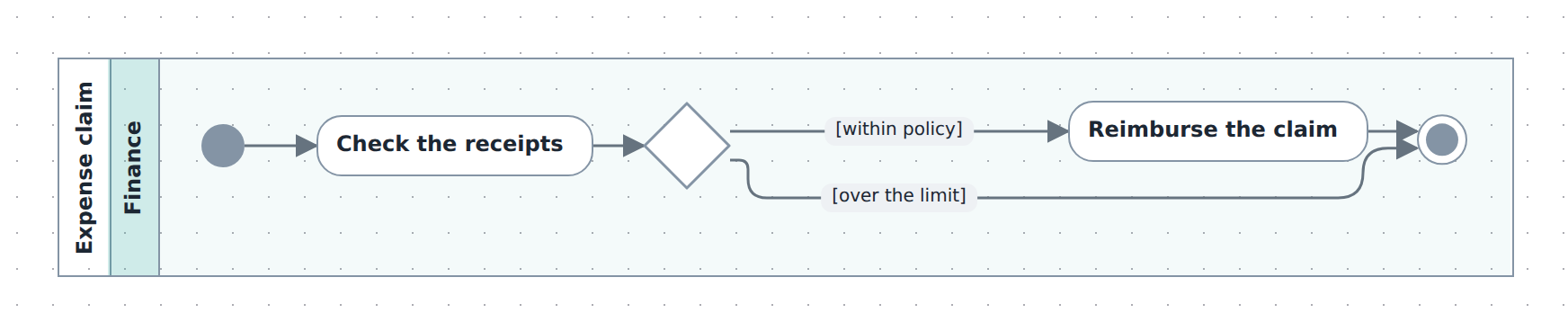
Starter — one lane, one decision, two guarded branches: the smallest flow that still branches. Copy it into .diagrams/src/ and change the names.
import { model } from '@diagc/core';

const m = model('expense-approval', { name: 'Expense approval' });

const act = m.activity('claim', { name: 'Expense claim' });
const finance = act.lane('finance', { name: 'Finance', color: '#3caea3' });

const start = finance.start();
const check = finance.action('check-receipts', 'Check the receipts');
const withinPolicy = finance.decision('within-policy');
const reimburse = finance.action('reimburse', 'Reimburse the claim');
const end = finance.end();

// A guard is just a relation label.
act
  .flow(start, check)
  .flow(check, withinPolicy)
  .flow(withinPolicy, reimburse, '[within policy]')
  .flow(withinPolicy, end, '[over the limit]')
  .flow(reimburse, end);

export default m;
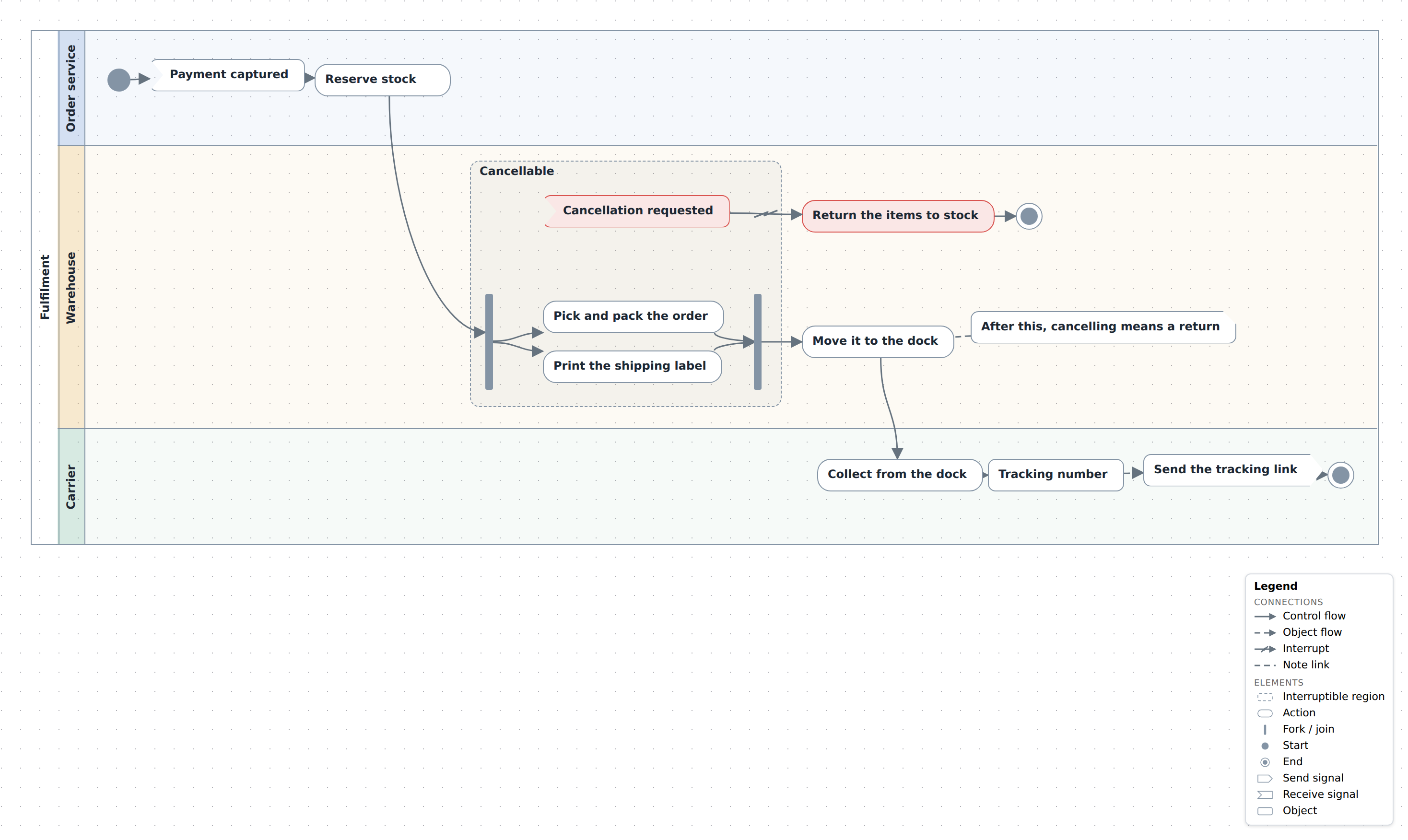
Order fulfilment — a paid order handed from the order service to the warehouse and on to the carrier, ending in a tracking link. It exercises region and interrupt for the part a cancellation can still stop, bar for the fork and join inside it, receive and send for the signals, objectFlow through an object for the tracking number, and a note with noteLink for the cut-off. Source
See also
- Builder API —
activity,lane,region, the element helpers,flow/objectFlow/interrupt/noteLink - Model reference — node types, relation kinds and validation codes
- Publish and share — the page and the PNG work as for any diagram